
1-Visitor
September 5, 2013
Solved

3D Plotting, every axis different units

  • September 5, 2013
  • 8 replies
  • 4906 views

Hi everyone,

I have a Problem by 3d plotting a function.

Unfortunally I don't know what the problem is about, I have 3 unit types.

W / m²

m

deg

Z-Axis should be W / m²

x axis m

y axis deg

Could please anybody check my mathcad file and correct the error, or tell me what to do?

In the second step I need to insert a constant surface into the plot, with the value of 100 W / m².

I want to compare the curve from E.IR with the constant surface. Interesting is

every E.IR value which is above the limit of 100 W / m².

Thanks a lot for your help!

PS: Here you can see my worksheet, I also attached my mathcad file.
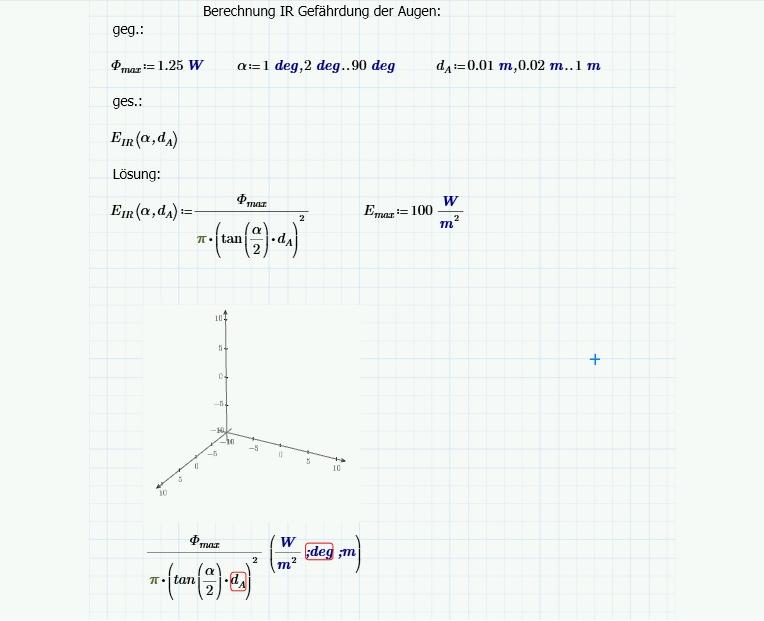
how+to+3D+Plot.jpg

Best Regards,

Alexander

Best answer by Werner_E

I would get rid of the range variables and use a special function for E.IR which does the degree radian conversion.

See attached

I would also do the divison by m^2 as in my first sheet so the dislplayed units would be correct, but I haven't changed that in the attached sheet.

8 replies

1-Visitor
September 5, 2013

Don't think its possible to apply units at abscissa and ordinate - only at the aplicate axis.

While the program is targeted to engineers according to marketing announcements, it sure was not written by or with the help of engineers, which is very sad.

So in your case the plot would say we see W instead of W/m^2.

You could use CreateMesh and divide the third element of the result (its a matrix) by m^2 so that the plot would show at least the correct unit. Not satisfyable in any way.

1-Visitor
September 5, 2013

Ok got you, sad world.

Thank you very much for your help!!!

I calculated everything without units, it worked.

My last problem is to include a constant surface into the 3d plot. It should be at the value of z=100, and be constant regardless of alpha und d.A.

Could you please give me a example how to fix this?

PS: Can you change the alpha values from rad to deg? Would be fine...

Best Regards,

Alexander

Werner_E
25-Diamond I
September 5, 2013

Its really disappointing. Mathcads plots never had publication quality but what PTC has done with that respect in Prime is inexcusable. The look of the 3D plots is inferiour. Its a big step backwards.

Nevertheless - look if the attached file would help.

3DPlotProblem.png3DPlotProblem2.png

1-Visitor
September 6, 2013

Hi Werner,

thank you very much for your help!

I understand your way theoretical how to fix the problem, formatting the alpha values from rad to deg, but when I try to implement this to my file it won't work

Mathcad showed different error types, when I tried it, most times it was the error, divided by zero.

Could you please help me a last time, and only fix the formatting from rad to deg in my 3d plot? This would be very helpful.

Attached you will find my mathcad file.

Thanks in advance!

Best regards,

Alexander

Werner_E
Werner_E25-Diamond IAnswer
25-Diamond I
September 6, 2013

I would get rid of the range variables and use a special function for E.IR which does the degree radian conversion.

See attached

I would also do the divison by m^2 as in my first sheet so the dislplayed units would be correct, but I haven't changed that in the attached sheet.