
1-Visitor
June 6, 2013
Solved

Abolute value truncates vectors?

  • June 6, 2013
  • 1 reply
  • 1249 views

In that attached MathCAD 14 worksheet I am attempting to find the absolute value of a vector divided by a number. For some reason, MathCAD is giving me a single value. Because they look similar, I double checked that I am using absolute value and not determinant.

Below this I tried to use an index value to perform the calculation one-by-one; but that did not work. In the first instance, the result is three periods; what dies this mean. In the second instance I received an error "This array index is invalid for this array." Is it not capable of counting through the vector in this way?

As always, I am indebted to the PTC Community for all the help I have received in making MathCAD greatly increase the efficiency of my work.
Best answer by Werner_E

The absolute value of a vector IS a scalar. I would be rather in despair if Mathcad would return a vector here.

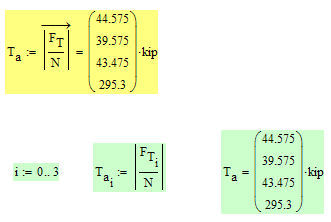
To get what you are after, again, vectorizing is the solution!

The problem you had in doing it manually was, that mathcad by default counts indices beginning with zero, not with one. This is controlled by the system variable ORIGIN. Usually its a good idea to leave it at the default value 0.

So if you change your range variable i to go from 0 to 3, your manual approach works, too

absolute_value2.png

1 reply

Werner_E25-Diamond IAnswer
25-Diamond I
June 6, 2013

The absolute value of a vector IS a scalar. I would be rather in despair if Mathcad would return a vector here.

To get what you are after, again, vectorizing is the solution!

The problem you had in doing it manually was, that mathcad by default counts indices beginning with zero, not with one. This is controlled by the system variable ORIGIN. Usually its a good idea to leave it at the default value 0.

So if you change your range variable i to go from 0 to 3, your manual approach works, too

absolute_value2.png

dsochor1-VisitorAuthor
1-Visitor
June 6, 2013

Thank you again Werner!