10-Marble
August 1, 2025
Solved

An array of checkboxes?

  • August 1, 2025
  • 1 reply
  • 1123 views

Hello
I am a newbie with regards to MathCAD in general and the Checkbox functionality in particular.
Running MathCAD prime 11.0.0.0

I just wonder if there is a convenient way of generating an array of checkboxes  so that one make it simple to can "click on all that apply".

Hope this is not too trivial..

Regards
Hallvard
Best answer by Werner_E

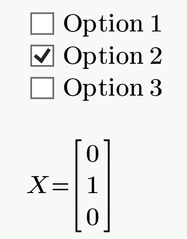
It should be trivial and it may be convenient, but check boxes in Prime are only isolated.

But you can assign the output to vector elements and so have all values available in one variable if that's needed.

Werner_E_0-1754054537309.png

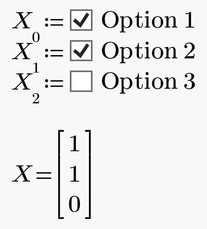
You may also hide the left hand sides

Werner_E_1-1754054577147.png


1 reply

Werner_E25-Diamond IAnswer
25-Diamond I
August 1, 2025

It should be trivial and it may be convenient, but check boxes in Prime are only isolated.

But you can assign the output to vector elements and so have all values available in one variable if that's needed.

Werner_E_0-1754054537309.png

You may also hide the left hand sides

Werner_E_1-1754054577147.png


10-Marble
August 1, 2025

Thank you Werner_E
Good to learn that what I am failing to achieve in principle is not possible. 😉

I guess what is confusing me is the apparent MathCAD flexibility of defining variables and functions on scalar, vector, or matrix forms in kind of a seamless way.

What I was hoping for was some kind of way to pass an array of text labels to the Checkbox control, which the control would displayed as shown in your second figure, and get an array of boolean showing which of the labels were checked.

Anyway I will try to work around it.

Regards
Hallvard

25-Diamond I
August 1, 2025

So your actual goal was to provide the label texts for the checkboxes via a matrix of strings?

Here is a way to do it, even though it may be not that straightforward as it would be desired.

Werner_E_0-1754057204069.png

The checkbox script is the same for all

Werner_E_2-1754057461600.png


They use an input which is the string to be displayed and are assigned vector elements. So the indices have to be changed individually for each check box:

Werner_E_1-1754057403732.png

It would be nice if the number of checkboxes could be controlled by the number of entries in the OptionYText vector, but thats not possible with this approach - you have to create the number of check boxes needed in advance.


Prime 11 sheet attached