
1-Visitor
November 25, 2010
Solved

An Arrow above a function?

  • November 25, 2010
  • 6 replies
  • 7369 views

Hello,

This may appear to be a stupid question but I saw this in the built in help and did not know how to enter it into my file.
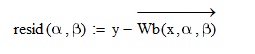
mathcad.jpg

This arrow above the function. How do I enter it?

and above all why is it there? What does it do?

Thank you

Best answer by MikeArmstrong

In the minerr quicksheet example x and y are a vector of values. So the function has been vectorized so each value of x and y are passed to the function inturn.

Mike

6 replies

1-Visitor
November 25, 2010

Its called the Vectorize operator and can be founf on the Matrix tooler

Description from the help menu:-The vectorized product returns an array of the same size as A and B in which each element contains the product of the paired elements of A and B. The non-vectorized product performs a standard matrix multiplication.

Simple example below.

Clipboard01.jpg

This is a very useful function and is constantly used by forum members.

Mike

UKMan1-VisitorAuthor
1-Visitor
November 25, 2010

Thank you for the helpful reply. I now understand the concept of the vectorize operator and it is easy to see it from your example but why use it in the screenshot I provided?

its not vector multiplication? So why is the vectorize operator used there? and what would happen without it?

BTW the screenshot is from the minerr quicksheet

1-Visitor
November 25, 2010

Its doesn't have to be used on a vector mulitiplication, look below.

Clipboard01.jpg

The above retuens an array. 1 if the element in row is not zero, a zero is returned otherwise.

Mike