
1-Visitor
March 27, 2013
Question

an explicit problem, how to explain it

  • March 27, 2013
  • 2 replies
  • 3659 views

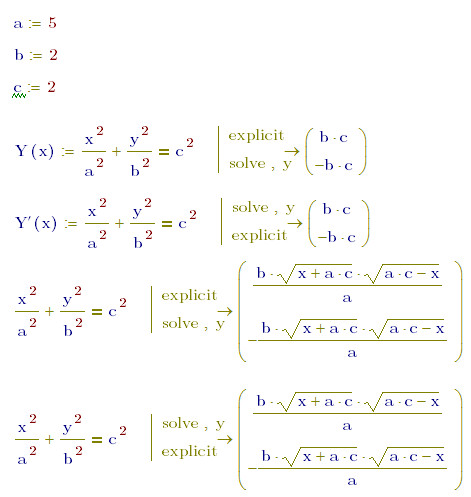
I solve a function by explicit pattern, and then assign the roots to a variable, the result is changed, like this picture.
explicitproblem.jpg

How to explain this problem?

And another, I input the "explicit" by keyboard, it do not work and return an error "Can't understand the grammar". I can only input "explicit" by click the symbol pallet. But in the "help", it said the user can input symbolic command by keyboard.

I'm use MathCAD 15 M020. Hope someone can explain it to me, thanks!

2 replies

25-Diamond I
March 27, 2013

An interesting effect. After all I would call it a bug. Lets wait for the opinion of other collabs.

You use excplicit in a way its probably not intended for - you normally would add the variables you want to see by typing explicit,a,b,c or explicit,ALL.

But even if you do so we a confronted with wrong results.

Concerning manual typing the keywords: You need to insert the appropriate symbolic evaluation arrow with the placeholder first (Ctrl-Shift-dot or take it from the palette).

Or after chosing a command with any keyword from the palette you can keep on typing different modifiers, separated by a ",". So you may have "solve,y,explicit,ALL" in one line, if you prefer that.

explicit1.png

19-Tanzanite
March 27, 2013

It's clearly a bug. The help even says "If you do not enter any variables after "explicit," Mathcad returns the original expression unchanged.", which is obviously not the case.

25-Diamond I
March 27, 2013

Richard Jackson wrote:

It's clearly a bug. The help even says "If you do not enter any variables after "explicit," Mathcad returns the original expression unchanged.", which is obviously not the case.

At least not if the evaluation is assigned a function. It looks like the formal parameter x of this function is not seen as a variable and set to zero (which is a bug indeed). Furthermore it is my understanding that the symbolic evaluation should not even be aware of the fact that its result would be assigned a function - I am amazed that it is.

12-Amethyst
March 27, 2013

Definitely a bug :

In the attached

Capture.PNG

Mathcad can evaluate P and R(X) but Q(x) is wrong & it seems to be assuming x=0 not a parameter.

If you need the function assigned then as the definition of Y(x) it can be done but not simply.

Regards

Andy

12-Amethyst
March 27, 2013

works equally wellCapture.PNG