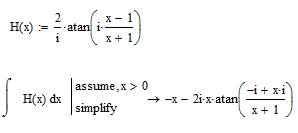
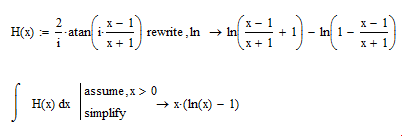
I'm not sure what you are looking for. The symbolic solution for X is just tan(LHS). Or are tthe x on the LHS and the X on the RHS supposed to be the same?
You experience the effect of numerical inaccuracy combined with ambiguity of "functions" (again!). E.g. Mathcad choses pi for the atan(..) for some values of x, giving the total result -2pi. Mathcads numerics add the very small imaginary part (which should be zero) and so that point isn't plotted. This happens quite often and so you see the holes in your graph. Reformulating the function definition as I had shown in another thread with the f1b() may help, but mustn't necessary. If you want to be on the safe side, define f2(x):=0. 😉
Can you tell us what you want to achieve with all this? You seem to know that used function are equivalent and the difference should simplify to zero - at least given some implicit assumptions about the domain of the involved variables and functions which Mathcad doesn't make. So whats the goal of all these attempts?
I am not sure why MC can write atan() as ln() but not the other way round. Both functions show ambiguity if applied to complex arguments (so strictly spoken they can't be called function therefore). Maybe is has to do with the fact that ln() is unique in the domain real and so Mathcad refuses to rewrite it with an ambiguous atan(). Maybe is just one of the many disabilities of MCs symbolics. Maybe it even can be done using the right combination and order of symbolic assumptons and keywords, Maybe ....
You experience the effect of numerical inaccuracy combined with ambiguity of "functions" (again!). E.g. Mathcad choses pi for the atan(..) for some values of x, giving the total result -2pi. Mathcads numerics add the very small imaginary part (which should be zero) and so that point isn't plotted. This happens quite often and so you see the holes in your graph. Reformulating the function definition as I had shown in another thread with the f1b() may help, ...
I am not sure why MC can write atan() as ln() but not the other way round. Both functions show ambiguity if applied to complex arguments (so strictly spoken they can't be called function therefore). Maybe is has to do with the fact that ln() is unique in the domain real and so Mathcad refuses to rewrite it with an ambiguous atan(). Maybe is just one of the many disabilities of MCs symbolics. Maybe it even can be done using the right combination and order of symbolic assumptons and keywords, Maybe ....