

1-Visitor
March 7, 2017
Solved

calling "HELP" Function generates an error message

  • March 7, 2017
  • 4 replies
  • 9094 views

Hi,

When calling the Help Function in MathCad Prime 3.1 or MathCad Prime 4.0 i get the error Message:
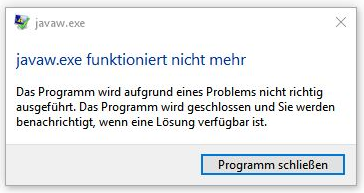
I'm working with Windows 10 and Java is still up to date.

Has anybody an idea?

Thank you

regards, Volker

Best answer by vlehner

Now there is a solution found:

The problem was a NVIDEA-Driver.

After uninstalling the driver, Prime-Help works perfectly.

4 replies

24-Ruby III
March 8, 2017

How do you call help (using the "Help Center" button or "F1" key) and what version of Java is more accurate? By the way online Mathcad Prime 3.1 help center available here: PTC Mathcad Prime 3.1 Help CenterUnlike the previous help centers available online through login the account on PTC's website isn't required now.


vlehner1-VisitorAuthor
1-Visitor
March 8, 2017

The error message comes up at F1 Key or at the Help Center Button.

Thank you for the Link-that works.

I see there are many problems with the Prime versions, what a shame.....

btw: In Mathcad 15 the Help works wihout any problems, so Mathcad 15 is the King!!!!

Java-Version:

JAVA_VERSION="1.8.0_121"

OS_NAME="Windows"

OS_VERSION="5.2"

OS_ARCH="amd64"

24-Ruby III
March 9, 2017

Volker,

1. Try to edit exception site list in "Java Control Panel" settings (tab "Security") and add the following (need to use forward slashes in the path😞

file:///C:/Program Files/PTC/Mathcad Prime 3.1

file:///C:/Program Files/PTC/Mathcad Prime 3.1/Help


Pic_1.png


Pic_2.png


2. Send your issue to PTC's tech support by using "Mathcad Support Center" (you can do it, even if you use Express version of Mathcad Prime):

Mathcad Support Center


24-Ruby III
March 9, 2017

Hi,

first of all I am not sure whether you can install Mathcad Prime 3.1 and 4.0 on the same machine simultaneously...

I installed Mathcad Prime 4.0 F000, launched it and clicked Help button on Resources tab. Help started without problems.

In Task Manager I can see following processes:

  • MathcadPrime_help.exe
  • javaw.exe (two times) ... MCP4_F000_LOADPOINT\Mathcad Prime 4.0\Help\jre\win32\jre\bin\javaw.exe

The above means that Help uses Java JRE available inside Mathcad installation. If I understand you well you have also your own java installation outside Mathcad. I guess that some Windows setting is the root of your problem (JAVA environment variables, system registry setting, ...)

Tip: Uninstall you "external"  JAVA installation and test Mathcad Help.

MH

23-Emerald IV
March 9, 2017

"I am not sure whether you can install Mathcad Prime 3.1 and 4.0 on the same machine simultaneously".

Apparently you can, according to the installation information, see the bullets in the picture of F.M.'s post below.

Luc

21-Topaz II
March 9, 2017

Hi Volker,

have you complied with the installation instructions? I'll show, here below, a part:

Prime 4.jpg

vlehner1-VisitorAuthor
1-Visitor
March 9, 2017

Hi F.M.

yes I did.

I only have MathCad Prime 4.0 and Mathcad 15 installed.

vlehner1-VisitorAuthorAnswer
1-Visitor
March 21, 2017

Now there is a solution found:

The problem was a NVIDEA-Driver.

After uninstalling the driver, Prime-Help works perfectly.

24-Ruby III
March 22, 2017

Unexpected solution to the problem.