
12-Amethyst
April 13, 2022
Solved

Chart component. Min. and max. values for axis with functions.

  • April 13, 2022
  • 1 reply
  • 3144 views

Hi

I need to define the max. and min. values for different graphs using some simple functions,

for example 1.2 times the max. computed X -value.

This was possible with Mathcad 15, but is it somehow possible with Prime 7?

What I have found so far, is that a user can only set max. and min. values manually, which is far from handy...


Also "Trace" option is missing from Prime...


As attached is a screen shot from Mathcad15 to illustrate what I mean.
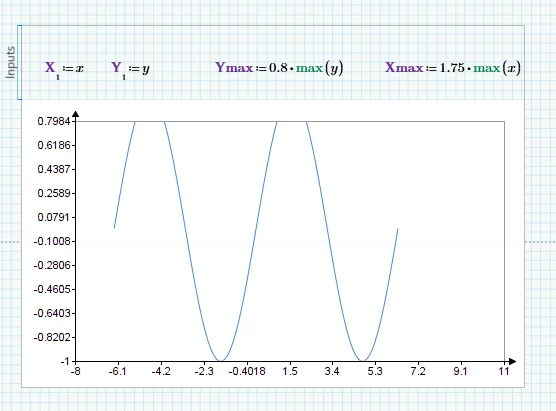
Best answer by StuartBruff

@TikkaMasala wrote:

Hi Stuart


Thanks for the quick answer.


Please correct me if I'm wrong, but your proposal only works when a graph is inserted from "plots" -> "x-y plots" -menus.

These plot types are very limited when editing and illustration of results is concerned...


With "Chart component" from "Math" menu, I can get somewhat decent looking graphs, but is it possible to get max. and min. values for the axis in these graphs similarly as in your proposal?


Yes, you can do it somewhat easier in the Chart component.   The limits have predefined names and you simply assign the value you want to them.


https://support.ptc.com/help/mathcad/r8.0/en/#page/PTC_Mathcad_Help/to_define_axes_limits_in_chart_component.html#wwID0EQL3IB


2022 04 13 c.png


Stuart


1 reply

23-Emerald V
April 13, 2022

@TikkaMasala wrote:

Hi

I need to define the max. and min. values for different graphs using some simple functions,

for example 1.2 times the max. computed X -value.

This was possible with Mathcad 15, but is it somehow possible with Prime 7?

What I have found so far, is that a user can only set max. and min. values manually, which is far from handy...


Also "Trace" option is missing from Prime...


As attached is a screen shot from Mathcad15 to illustrate what I mean.


Yes, it is possible to add computed limits and in pretty much the same way as in M15.   There are no place markers as in M15 and the process is a little bit more fiddly because of the small font sizes, but ...


You have to place your cursor in the max value on the axis, delete the value, and then type your expression.


2022 04 13 b.png


See https://support.ptc.com/help/mathcad/r8.0/en/#page/PTC_Mathcad_Help/to_edit_tick_mark_values.html#wwID0E5BZIB


However, the Trace and Zoom functionalities are missing.


Stuart

12-Amethyst
April 13, 2022

Hi Stuart


Thanks for the quick answer.


Please correct me if I'm wrong, but your proposal only works when a graph is inserted from "plots" -> "x-y plots" -menus.

These plot types are very limited when editing and illustration of results is concerned...


With "Chart component" from "Math" menu, I can get somewhat decent looking graphs, but is it possible to get max. and min. values for the axis in these graphs similarly as in your proposal?

23-Emerald V
April 13, 2022

@TikkaMasala wrote:

Hi Stuart


Thanks for the quick answer.


Please correct me if I'm wrong, but your proposal only works when a graph is inserted from "plots" -> "x-y plots" -menus.

These plot types are very limited when editing and illustration of results is concerned...


With "Chart component" from "Math" menu, I can get somewhat decent looking graphs, but is it possible to get max. and min. values for the axis in these graphs similarly as in your proposal?


Yes, you can do it somewhat easier in the Chart component.   The limits have predefined names and you simply assign the value you want to them.


https://support.ptc.com/help/mathcad/r8.0/en/#page/PTC_Mathcad_Help/to_define_axes_limits_in_chart_component.html#wwID0EQL3IB


2022 04 13 c.png


Stuart