1-Visitor
February 23, 2012
Solved

Closing a "Solve Block" around the constraint that a vector cross product be zero

  • February 23, 2012
  • 2 replies
  • 13257 views

Hello World.

I am using a solve block in MathCAD 15, and it does not close around a constraint that a cross product of two vectors have a root of zero.

In this solve block there is some matrix algebra and some that functions, such that a vector (R0) starting out at one orientation, after two bounces (in two mirrors rotating on two orthogonal axes), ends up in another defined location. There are two mirror positions (alpha1 and alpha 2) which satisfy these conditions completely and uniquely as long as skewness of the initial vector is 'reasonable' for the physical arrangement (e.g. under 30 degrees). The clocking may be anything. In this example it is set at 90, which drives alpha 1 to the exact value of 45 degrees.

In this set of equations, when the root of a cross product between the vector between the last two points of the vector chain (a point of reflection off the last mirror and the destination point) and the unit vector for the reflection off the second mirror, is solved such that root is zero, then both mirror angles are found.

In the first example (blue) the Solve Block does not close, and the cross product error is large.

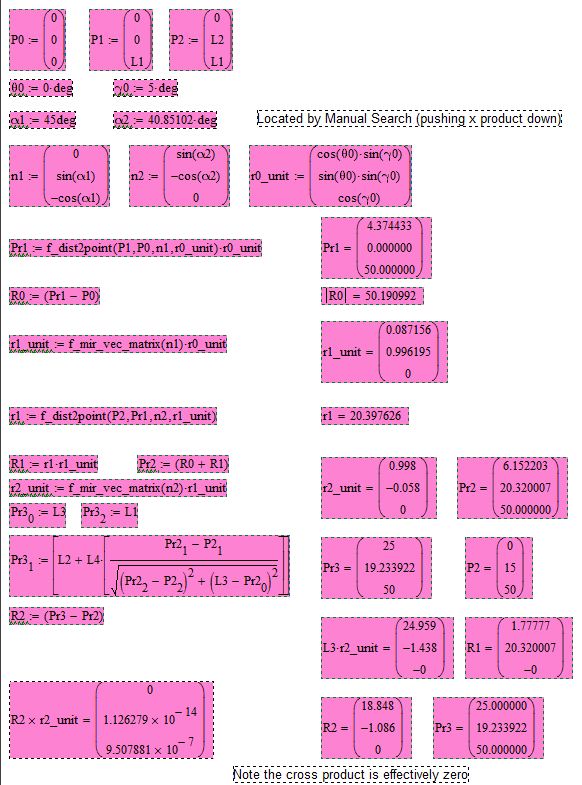
The second example (red) I solved the equation by manual search (this is not hard, but is slow), by perturbing the values of alpha1 and alpha 2 until the cross product was acceptably zero.

Why can't the solve block do automatically, what I find it relatively straight forward to do by hand?

I suspect that there is some kind of protocol error, but I don't see it. The whole file is attached, in compressed form. The green colored solve block is on page 8, the red colored is page 9.

Thanks,

Robert
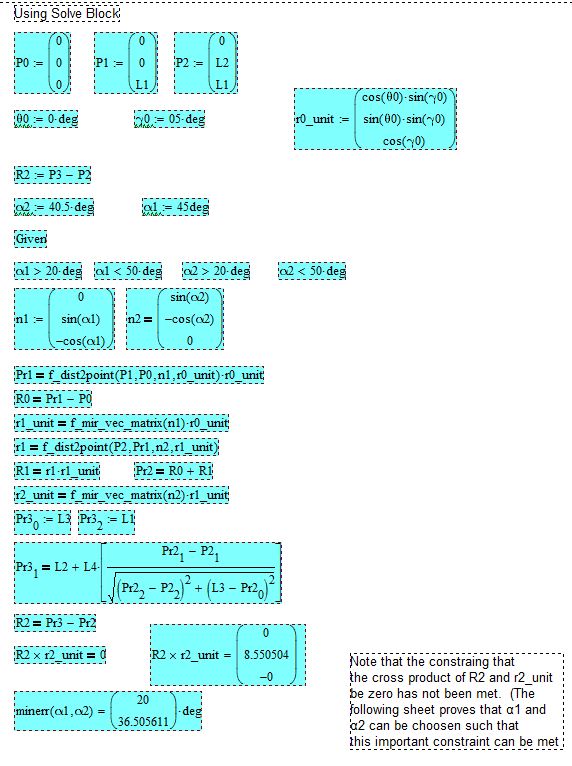
vector cross product w solve block.JPG

vector cross product without solve block showing manual solution.JPG

Best answer by RichardJ

Here. It's up to you to check it's actually calculating what you want ti to calculate! I did not spend the time to look through your worksheet in great detail. I just made the solve block work in what seems like a reasonable way.

2 replies

1-Visitor
February 23, 2012

Here is an image of page 8 in the file showing the solve box which does not close. The guesses of alpha 1 and 2 are very close to the known values, but the error is huge.

vector cross product w solve block mark up.JPG

1-Visitor
February 23, 2012

This set of calculations demonstrates that there are values of Alpha 1 & 2 which satisfy the constraints completely, driving the error down below six places to the right of the decimal. I found this solution manually by perturbing Alpha 1 and 2 until the error was acceptably small.

vector cross product without solve block showing manual solution mark up.JPG

1-Visitor
February 23, 2012

For those of you using earlier versions, here is the file saved as an M13 version.

The solve block which won't work is on page 8. Everything else seems to run fine.

Robert

19-Tanzanite
February 23, 2012

A couple of things.

First, aside from the constraint issue, I am not sure that the solve block is doing what you think it is. Numerical assignments inside solve blocks are NOT part of the solve block. They didn't even used to be allowed. So if you think that somehow during the solve the value of n1, for example, is being changed every time alpha1 is changed, and that is then carried through to the equation for Pr1, it's not. I personally wish they had never allowed this, because it just leads to confusion. Take all the assignments outside of the solve block (that usually means before it). The only things you should have inside the solve block are equalities and inequalities. Nothing else, even if Mathcad happens to permit it. Your evaluation of the cross product is also NOT part of the solve block. The answer you are getting is just based on the guess values, not on the values the solver finds. Evaluate it after the solve block, based on the variables returned by the solve block, alpha1 and alpha2.

Second, the constraints in minerr are treated differently to those in, for example, minimize. The errors in the constraints are minimized along with everything else. In other words, they are soft constraints, not hard constraints. If you want them to act as hard constraints then you need to weight them very heavily. Replace the constraint with (R2 x r2_unit)*10^16=0. That will force the cross product to be effectively zero. This also applies to your constraints for alpha1 and alpha2.

1-Visitor
February 23, 2012

Very interesting what you have to say about weighting the cross product. I have never seen that done, however I can see that it is quite powerful as a method.

I will try that immediately.

19-Tanzanite
February 23, 2012

I don't think you will like the answer you get

I believe that's because of the other issues with the solve block though, which also need to be fixed.