
9-Granite
December 3, 2024
Solved

Compatibility of tables between Mathcad and Mathcad Prime

  • December 3, 2024
  • 3 replies
  • 1443 views

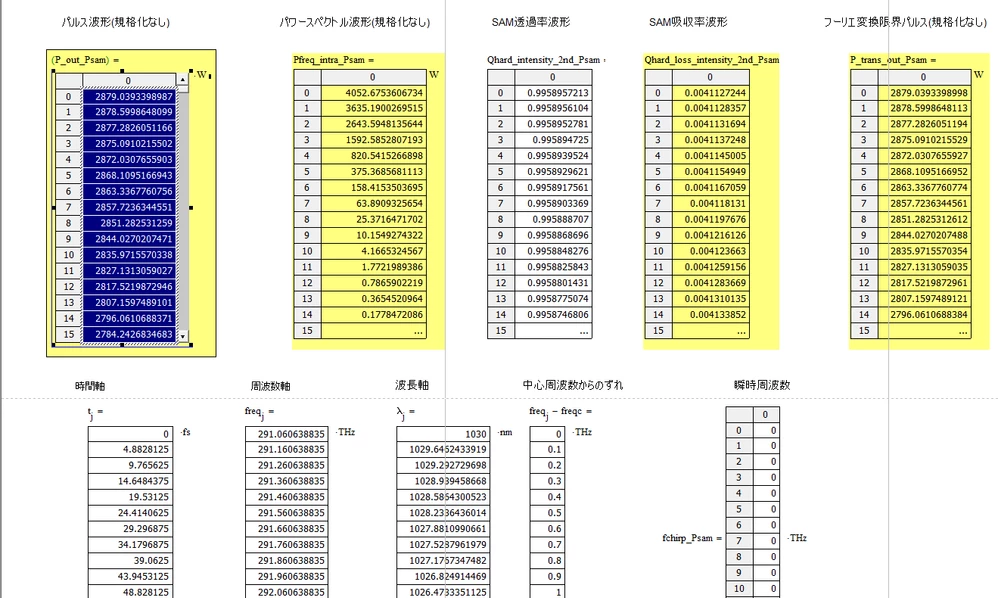
In Mathcad14, the calculation results are output in an array table as shown in the attached image. In this case, if you copy the output table and paste it into Excel, one value is entered into one cell. However, when you run it through a converter, calculate it in Mathcad Prime, and copy and paste the results, all the values ​​are entered into one cell.

Are there any compatibility issues with this behaviour between Mathcad and Mathcad Prime?

Could you please tell me a solution?


Translated by the moderation using Google Translate
-----------------------------------------------------------------------------------------------


mathcad14で添付図のように計算結果を配列で表に出力しています。この場合、出力された表をコピーしてエクセルに張り付けると、1つのセルに1つの値が入力されます。しかしコンバーターを通し、mathcad primeで計算し結果をコピー&ペーストしたところ、1つのセルにすべての値が入力されてしまいます。

mathcadとmathcad primeではこの動作について互換性はないのでしょうか。

また解決策を教えていただけますでしょうか。スクリーンショット (1).png
Best answer by Werner_E

Yes., copy & paste is severely broken in Prime - or maybe "just" silly and amateurish implemented.

You can not select a range of values in a matrix as usual using shift left click and therefore you will also notice that when you copy from a vector/matrix in Prime you can only copy the whole visible displayed elements and are not able to use scrolling to copy the whole vector as we could do in real Mathcad.


Maybe using WRITEEXCEL to export the data can be a workaround for you.
Or you could insert an Excel component in Prime and use the vectors as inputs. Double clicking the component opens it in Excel and you could copy the desired values from there to the target excel sheet.

Life could be so easy - unfortunately not when using Prime...

3 replies

Werner_E25-Diamond IAnswer
25-Diamond I
December 3, 2024

Yes., copy & paste is severely broken in Prime - or maybe "just" silly and amateurish implemented.

You can not select a range of values in a matrix as usual using shift left click and therefore you will also notice that when you copy from a vector/matrix in Prime you can only copy the whole visible displayed elements and are not able to use scrolling to copy the whole vector as we could do in real Mathcad.


Maybe using WRITEEXCEL to export the data can be a workaround for you.
Or you could insert an Excel component in Prime and use the vectors as inputs. Double clicking the component opens it in Excel and you could copy the desired values from there to the target excel sheet.

Life could be so easy - unfortunately not when using Prime...

9-Granite
December 4, 2024

Thank you for your reply.


In your opinion, would you recommend using WRITEEXCEL or the Excel component?

Also, by default, the Excel component opens a new untitled Excel file.

Is it possible to achieve this behaviour using an Excel file that I have saved?


Translated by the moderation using Google Translate
-----------------------------------------------------------------------------------------------


回答ありがとうございます。


あなたの意見でいいので、WRITEEXCELを使用するか、Excelコンポーネントを使うかどちらがおすすめでしょうか。


またExcelコンポーネントでは初期状態だと新たな無題のExcelを開きます。

この動作を自分が保存しているExcelのファイルを使用することは可能でしょうか。

9-Granite
December 4, 2024

Sorry, there was a typo.

Which do you recommend, using WRITEEXCEL or the Excel component?


Translated by the moderation using Google Translate
-----------------------------------------------------------------------------------------------


すいません。誤字がありました。

WRITEEXCELを使うか、Excelコンポーネントを使うかどちらをおすすめしますか?


24-Ruby III
December 4, 2024
ttokoro
21-Topaz I
21-Topaz I
December 4, 2024

As explained below, there are various ways to deal with this issue. If you need help in Japanese, please contact us on this SNS.

Tokoro.


Translated by the moderation using Google Translate
-----------------------------------------------------------------------------------------------


下記の説明にも有りますが対応策は色々とあります。日本語での対応であれば所にこのSNSでコンタクトして下さい。

Tokoro.

t.t.
