
1-Visitor
April 24, 2014
Solved

Correcting units

  • April 24, 2014
  • 1 reply
  • 3993 views

I converted a file from Mathcad 15 to Mathcad Prime and I am now having trouble with some of the units. The values are correct and match what I calculated in 15, but I can't get the units to read out correctly. They should be in*lb, but it keeps adding 1/kg*m to the units. If I switch to USCS for the unit system, it adds 1/ft*lbf and then the value is incorrect. I'm wondering if it has something to do with the excel inputs I added, as this is the only addition I've made after converting to Prime. I've attached the file for reference.

Any help would be appreciated, thanks!
Best answer by Werner_E

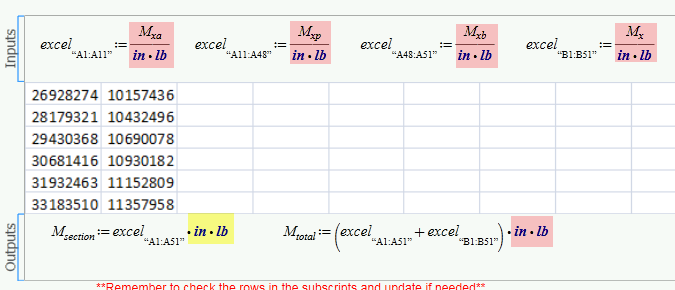
I guess the problem are the input values at the top of the Excel component. You feed the component with values of unit lb*in but Prime has to strip the units as Excel doesn't understand units. But Prime does not strip lb*in just because you defined the values that way, but it will strip the default units which are kg*m in your sheet. So Excel gets wrong values. So you have to strip the units yourself by just dividing by the correct units and add the units you want at the end for the output variables. I hope this solves your problem - you don't state in your file which values are wrong and what the correct result is you expect, so I can only guess.

24.04.png

1 reply

25-Diamond I
April 24, 2014

Not sure why you expect something else.

The problem seems to be that you read M.total and M.section via Excel component and those moments are dimensionless. You should add the appropriate units - you can do this directly in the Excel component:

24.04.png

1-Visitor
April 24, 2014

Yes, but where to add them? I've tried adding them in the excel output definition (as you have shown) and it seems to correct the units, but the caluculated value is no longer correct. The values in the excel spreadsheet are defined earlier in the matchcad sheet, with units. Do they need to be redefined once I input them into the excel sheet?

Werner_E25-Diamond IAnswer
25-Diamond I
April 24, 2014

I guess the problem are the input values at the top of the Excel component. You feed the component with values of unit lb*in but Prime has to strip the units as Excel doesn't understand units. But Prime does not strip lb*in just because you defined the values that way, but it will strip the default units which are kg*m in your sheet. So Excel gets wrong values. So you have to strip the units yourself by just dividing by the correct units and add the units you want at the end for the output variables. I hope this solves your problem - you don't state in your file which values are wrong and what the correct result is you expect, so I can only guess.

24.04.png