19-Tanzanite
August 20, 2024
Solved

Curve fitting problem - Core Loss Density Curves

  • August 20, 2024
  • 2 replies
  • 1071 views

Hello,

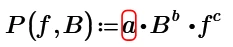
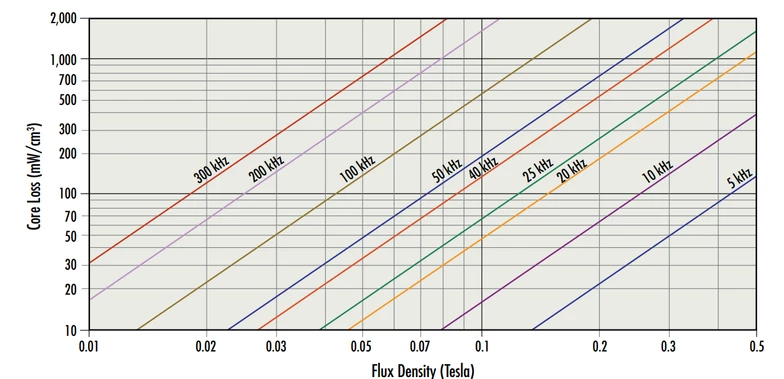
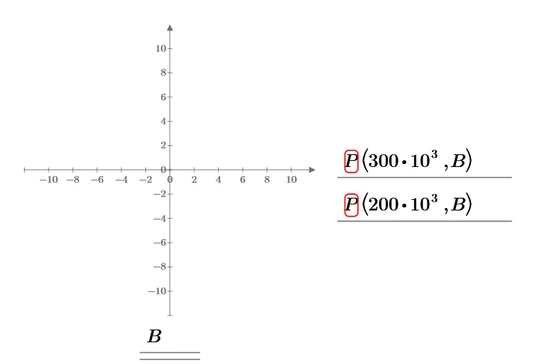
Using this fit formula from below, how to determine a, b and c coefficients in such a way to fit the below plot Core Loss vs Flux density:

Cornel_1-1724151383659.png

Cornel_0-1724151851586.png

or

Cornel_0-1724152014529.png


Cornel_0-1724151366039.png

So, I think (but I do not know how to do) to read all the data points of each line (300kHz, 200kHz, etc) and then to make the curve fitting by using genfit Mathcad function, minerr or something like that.

Cornel_1-1724152093919.png

Best answer by Werner_E

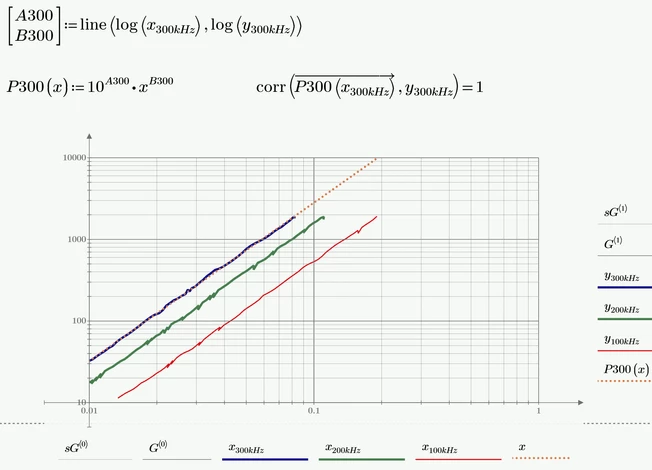
If the goal is to find a separate fit for every frequency given, you could also use "line" to do so.

Here for 300kHz:
Werner_E_0-1724194131801.png

"B300" is the very same which you called "b". But you would get a slightly different value when you do the same for the other frequencies.

10^A300 is your a*f^c with f=300.


But I guess that you are looking for constant values a, b and c which are valid for any frequency.

To find these values I would suggest using a solve block with "minerr":
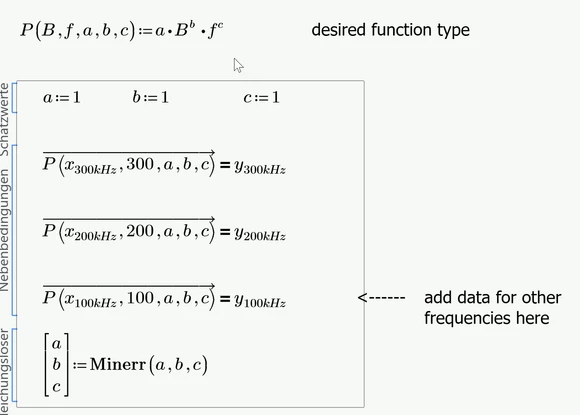
Werner_E_1-1724194365578.png

Thereafter you may define a function P which is only dependent on B and f and because with Prime we are using something similar to Mathcad, it may be a good idea to add correct units

Werner_E_2-1724194415985.png

Now you can use this function with any input value you like
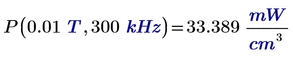
Werner_E_3-1724194568158.png   
Werner_E_4-1724194578478.png

and of course also for plotting with different frequencies

Werner_E_5-1724194648954.png

And as its a function with two arguments, you may also create a 3D-Plot if you like

Werner_E_6-1724194906164.png


Prime 10 sheet atached


2 replies

Cornel19-TanzaniteAuthor
19-Tanzanite
August 20, 2024

For example below are the data points for the 3 lines: 300kHz, 200kHz, and 100kHz lines from above graph.

Cornel_0-1724165015486.png


Cornel_2-1724165136944.png


MCP10 file attached.


Both x and y axis are log scale.

Now we need to find the values of a, b and c coefficients in such a way to be able to generate these lines also with the above formula by fitting these curve with that given formula, by using genfit/mineer or something similar mathcad functions.

21-Topaz II
August 20, 2024

Hi,

Have done the first line for you.

Capture.JPG

Cheers

Terry

Werner_E25-Diamond IAnswer
25-Diamond I
August 20, 2024

If the goal is to find a separate fit for every frequency given, you could also use "line" to do so.

Here for 300kHz:

Werner_E_0-1724194131801.png

"B300" is the very same which you called "b". But you would get a slightly different value when you do the same for the other frequencies.

10^A300 is your a*f^c with f=300.


But I guess that you are looking for constant values a, b and c which are valid for any frequency.

To find these values I would suggest using a solve block with "minerr":

Werner_E_1-1724194365578.png

Thereafter you may define a function P which is only dependent on B and f and because with Prime we are using something similar to Mathcad, it may be a good idea to add correct units

Werner_E_2-1724194415985.png

Now you can use this function with any input value you like
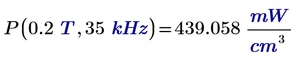
Werner_E_3-1724194568158.png   
Werner_E_4-1724194578478.png

and of course also for plotting with different frequencies
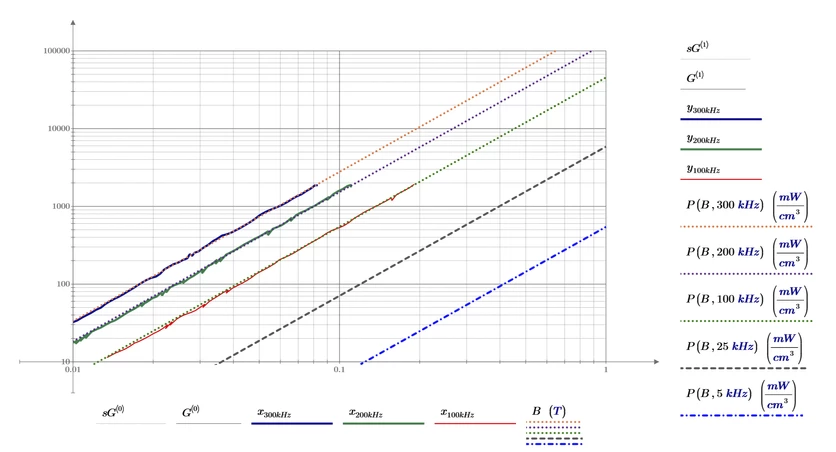
Werner_E_5-1724194648954.png

And as its a function with two arguments, you may also create a 3D-Plot if you like
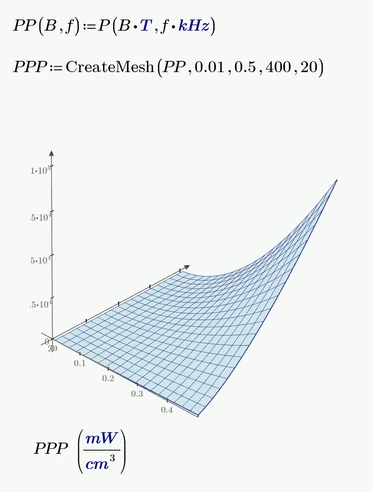
Werner_E_6-1724194906164.png


Prime 10 sheet atached