
1-Visitor
June 25, 2013
Solved

Define multiple vector positions in one line

  • June 25, 2013
  • 6 replies
  • 3913 views

In the attached MathCAD 14 worksheet, I have a 12 position vector and want to set the first 4 terms equal to one value, second 4 terms equal to one value and the third 4 terms equal to one value without having to define each term individually. Is there a way to do this in three seperate lines or possibly one line?
Best answer by Werner_E

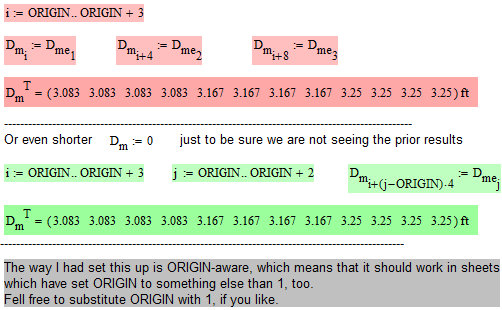
Here are two more ways using range variables:

positions1.png

6 replies

19-Tanzanite
June 26, 2013

A few ways in the attached.

Alan

Werner_E
Werner_E25-Diamond IAnswer
25-Diamond I
June 26, 2013

Here are two more ways using range variables:

positions1.png

23-Emerald IV
June 27, 2013

Here are two more ways to do it:

Matrixfillers.gif

Success!

Luc

(Sorry I couldn't look at Alan's methods, I'm on Mcad 11 only now)

Werner_E
25-Diamond I
June 28, 2013

(Sorry I couldn't look at Alan's methods, I'm on Mcad 11 only now)

Here you are

alan.png