1-Visitor
July 23, 2018
Solved

Differential system

  • July 23, 2018
  • 5 replies
  • 7082 views

Hi,


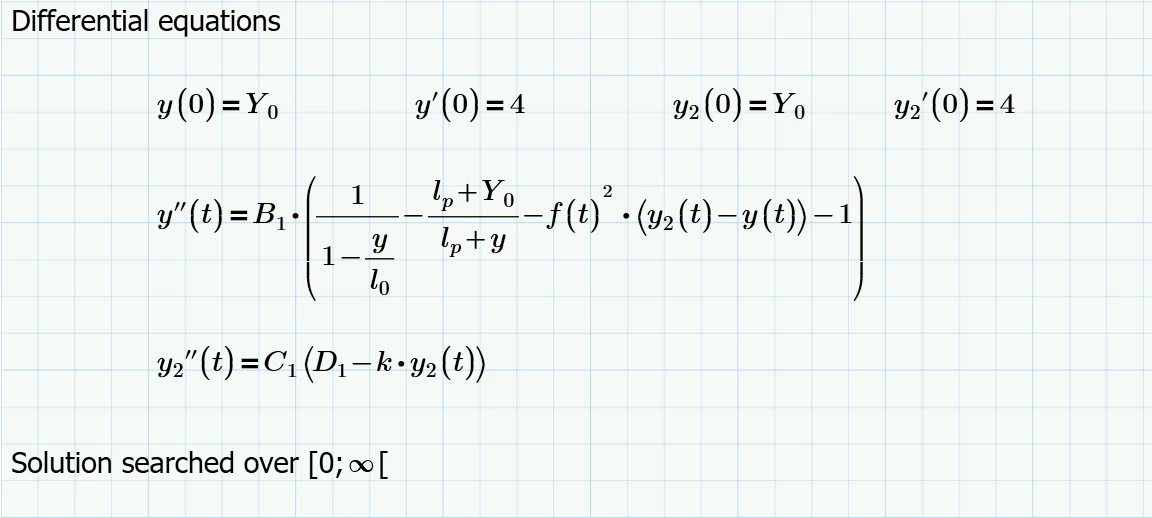
I'm trying to solve following system of non linear equations.

Can someone help me to put it in the correct form? I'm not familiar yet with Prime 4.0 and the different solvers.

Thanks a lot.


Differential.png

Best answer by Werner_E

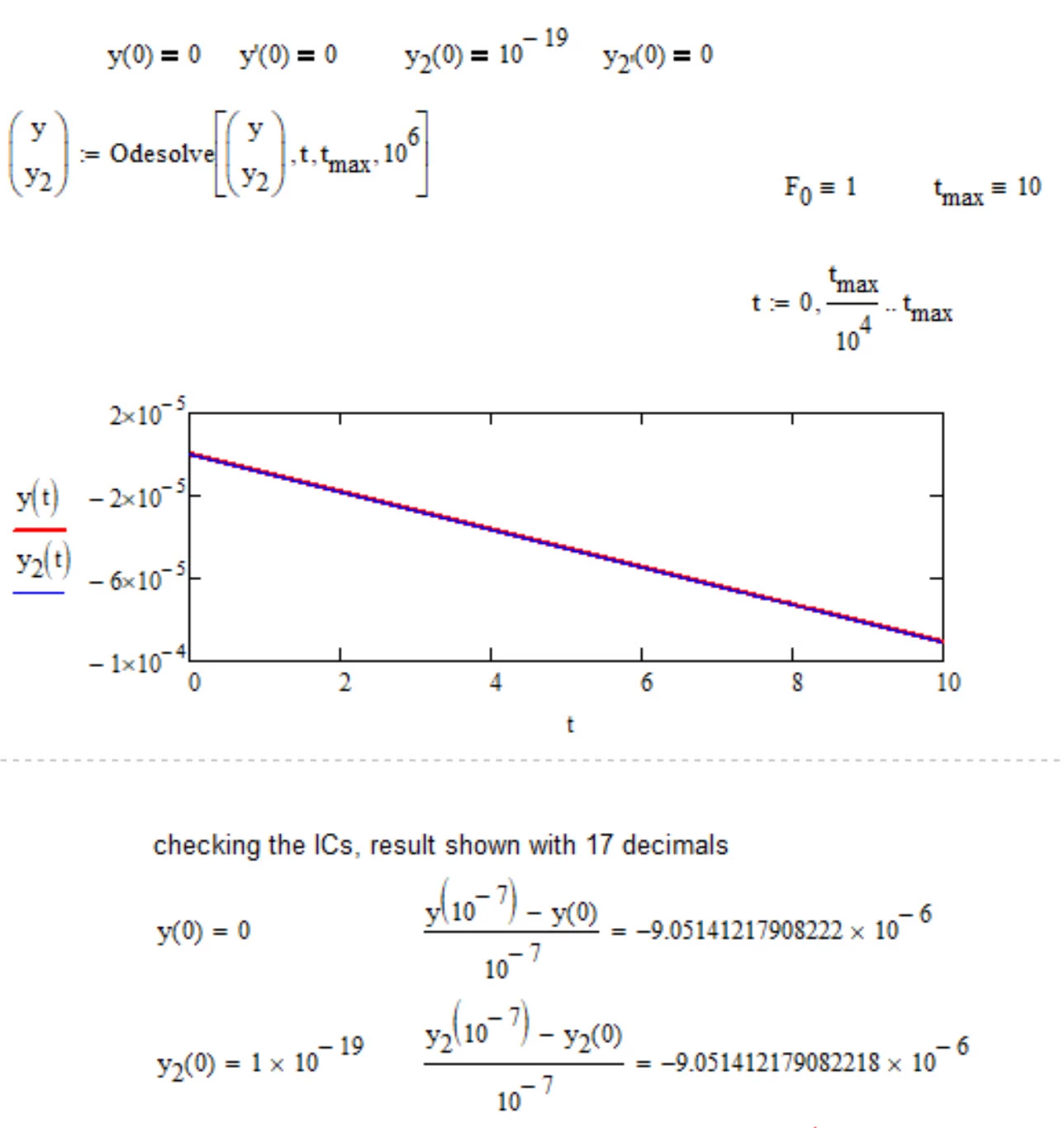
I have tried y(0)=0 in your/my former sheet (without the units) and I don't get an error if I use the last, optional parameter of odesolve (nsteps=number of steps) and set it to something higher (10^6) than the default 10^3. But the calculation will not stop if I do so. Changing the IC to y(0)=10^-19 works with nsteps=10^6), but the result obviously is not what you expect.

I also noticed before in experiments I made with your older sheets that your ICs concerning the derivatives where not respected by Mathcads solutions. You had y'(0)=y2'0)=4, but the numerically derived derivates of the solutions always differed significantly.

I used the older sheet as your new one is a little bit too confusing for me and because I think you should not add units until the unitless version works OK - especially as you make the solve block unitless not by dividing by the base units but use mm and ms, which I think is additionally failure prone.

I clearly have no idea whats the problem with your system and so I am just poking around.
B.jpg

5 replies

23-Emerald I
July 23, 2018

Mathcad will solve this best numerically; for that you would need to define a value for all constants.

Benoit1-VisitorAuthor
1-Visitor
July 23, 2018

Thanks for the answer. All the constants and functions are defined in the attachment.


I can solve this numerically like on excel yes but I was hoping there would be some function or better way to solve this than to do y(t+dt)=y(t)+y'(t)*dt

Thanks anyway.

23-Emerald IV
July 23, 2018

The following is unclear, missing etc:

- k is undefined

- y is undefined (or did you mean it to be y(t)?)


Look up the help information regarding solving differential equations using a 'solve block'.


Success!
Luc

25-Diamond I
July 23, 2018

As was already said you did not define k and used y (presumably instead of y(t)).


Another error is that you typed C.1(D.1....) instead of C.1*(D.1...). That way this C.1 is seen as an unknown function.

As you can solve only numerically, you have to provide an upper limit for t. The lower limit 0 is derived automatically from the initial conditions.


Normally you would use a solve block with odesolve to do the job, but for some reason unknown to me this solve block fails (as so often in Prime with an unknown error).

B1.jpg

You can solve for y2 first (it does not depend on y) which works OK and use the result in a second solve block for y. Unfortunately this second solve block fails again. So for some reason Prime seems not to like the equation for y''.

B2.jpg

24-Ruby IV
July 23, 2018

yyy.png

Benoit1-VisitorAuthor
1-Visitor
July 23, 2018

Sorry for the small errors on my side. The first equation is easy to solve without using mathcad (especially the odesolve bloc doesn't work for me for some reason). I added this equation in the system because I want to add a non linear component to it in a further stage...

My problem is clearly with the second, not linear one which can't be solved by odsolve (according to the help files it can only solve linear ODE).


I've thus tried several options to solve it numerically but I'm sure my way is not optimised and it really takes forever to solve it... (see attachment)

23-07-_2018_14-56-25.png

25-Diamond I
July 23, 2018

OK, I was wrong about Knitro!

I had two wrong signs in my Mathcad 15 sheet and one of them made the whole solve block work.

Using the original sign makes the block fail in Mathcad 15, too. Error message is "Divide by zero".

B1.jpg

Using the wrong sign in Prime makes the solve block work as in MC15.

Fazit: The problem is not a bug in Knitro and its not because of some non-linearity of the equations.

Are you sure, the equations are correct and have a solution?

Here is the result of Prime using the wrong sign. Worksheet in P4 format attached.

B2.jpg

25-Diamond I
July 23, 2018

Need more coffee!!

Just noticed another mistake I made when I retyped the system in MC15. One of the IC was wrong.

With the original ICs (the same for y and y2) the result seems to be y=y2.

But still a result is only obtained using the wrong sign as indicated.

B.jpg

23-Emerald IV
July 23, 2018

Using the knowledge that y2 can be solved independently from y, and using Mathcad 11, I get:

LM_20180723_Ode.png

Does this come close to what you expect?


Luc


25-Diamond I
July 23, 2018

Below is what I get when I open your sheet in MC15.

Interesting is the wrong result for y2. This is due to the high endvalue 10^4 for t you had chosen. Only get the correct solution if I add a higher value for the number of steps -> y2:=odesolve(t,E,10^5)

As you can see the second solve block fails again with a "Divide by zero" error.

What did they change in the numerics on the way from MC11 to MC15 ?

B.jpg

Benoit1-VisitorAuthor
1-Visitor
July 24, 2018

Hi Werner,


I went again through the equations and put that in your file using mathcad 15 (way more familiar with that one than the prime version). I checked the different values and corrected some I overevaluated.

I think also the problem is of convergence so limit conditions.

I put these conditions in the equations of both y and y2 but well, Mathcad doesn't like it and I couldn't solve this problem separately either...

Thanks for the answers also.