

1-Visitor
May 23, 2016
Question

Dot notation and unit vectors for kinetic analyses

  • May 23, 2016
  • 1 reply
  • 7742 views

Hi,

I'm trying to get to grips with MathCad Prime, I'm using my old college notes and trying to recreate the solutions to example problems in Mathcad as a way of learning the tool.

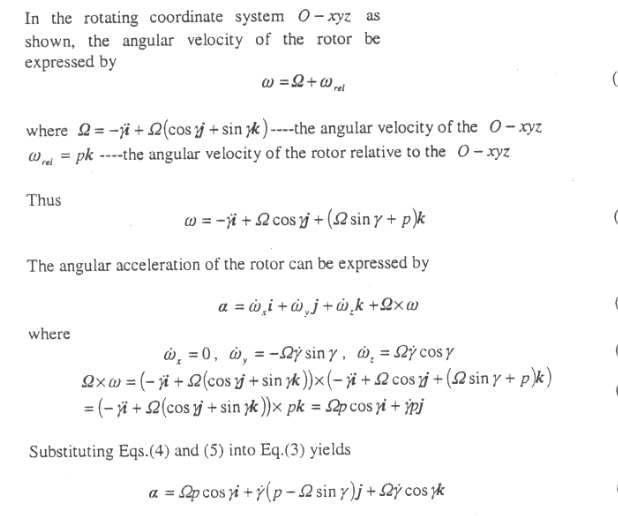
I'm struggling with the below 'kind' of problem. I used to love working in this kind of notation, i.e. dot-derivatives, unit vectors, etc. makes it quick and easy on paper.

I'm wondering what are the best techniques in Mathcad to use to recreate this solution approach in mathcad and work through the problem?

i, j, k are unit vectors in x, y an z directions, gamma(dot) is a rotational velocity or derivative of gamma which is the rotation angle.
Capture.PNG

1 reply

21-Topaz II
May 24, 2016

More or less, you can do something like this:

(I apologize for the errors and omissions that I hope,  will be referred to me.)

Since with j and i, I indicate the imaginary unit, to define the unit vectors in Cartesian coordinates, I opted for ix, iy iz.

With best regards

FM

Vector Identities.jpg

gcostello1-VisitorAuthor
1-Visitor
May 24, 2016

Thank you!

Is there any significance in the difference in formatting between your different variables? i.e. the ix is bold red, U is bold blue. When I write it out in Mathcad prime, they are just normal black.

23-Emerald V
May 24, 2016

Glyn Costello wrote:

Thank you!

Is there any significance in the difference in formatting between your different variables? i.e. the ix is bold red, U is bold blue. When I write it out in Mathcad prime, they are just normal black.

In Mathcad 15 (and at least back to Mathcad 2000), you could assign a Math Style to a variable.   You could specifiy the font, colour and the common attibutes (bold, italic) to for the style.  The default style for variables is, for some reason that escapes me, called "Variables".   Mathcad regards a variable with a style as being different variable, which is quite useful when, for example, you wish to distinguish between a vector/matrix and a scalar..

There are 7 "User" Math Styles, which you can define (and rename) via the Menu Format/Equation.  Here's an example of modifying the User 3 Math Style.

If you name your Math Styles suitably, it can be quite quick to apply them using the key sequence Alt-o, enter, <style letter>, enter.   For example, on my standard Normal template, I've given them names that start with a letter of the alphabet, so I just type Alt-o,enter,d,enter to pick my "D Style (User 4 style)".

Unfortunately, Mathcad Prime's equivalent, whilst smarter in some respects (eg, it's unit aware) isn't quite as flexible.

Stuart