1-Visitor
December 13, 2022
Solved

Error making a vector form a function

  • December 13, 2022
  • 1 reply
  • 1753 views

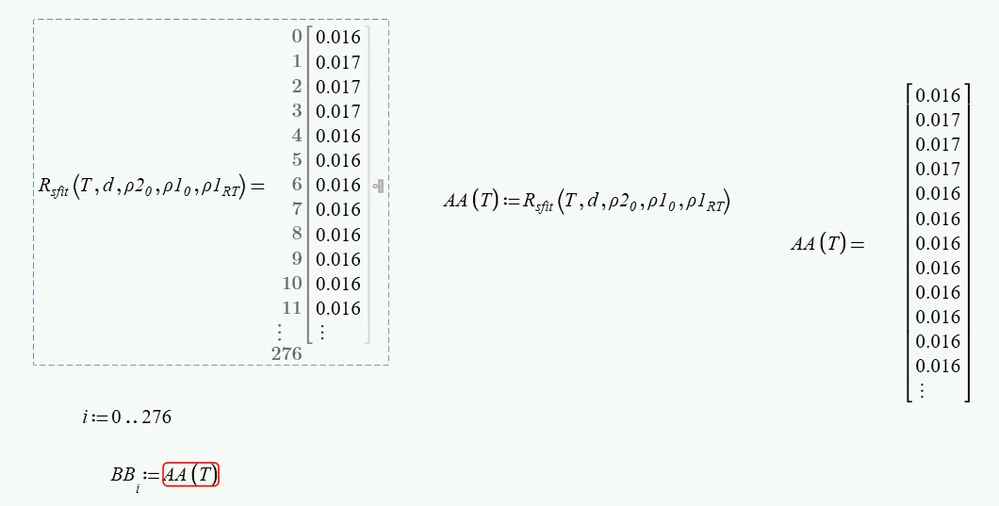
I'm just trying to make a vector from a function so that I can export the values
Screenshot 2022-12-13 095044.png

However MathCad Prim 8.0 give the error "This value must be a scalar or a matrix". Why???

Needless to say, not having the ability to just select all values from an array and copying and pasting, like it was possible in MathCad 15 is really, really annoying

Best answer by terryhendicott

Hi,

T in your sheet is a range variable and subsequent expressions use it as a column vector and this generates error.

There are two ways to create the column vector  T

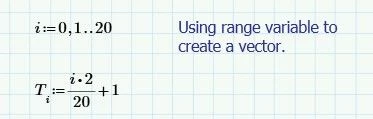
The "official way" is to create a range variable and use the range variable to create the column vector T. see Version 2 file below.

Capture.JPG

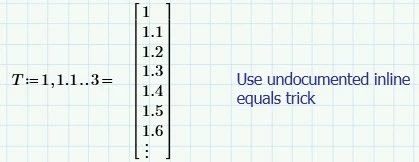
The "undocumented" way is to simply use the inline equal sign after the creation of the range variable T that turns T into a column vector.

Capture2.JPG

Cheers

Terry


1 reply

21-Topaz II
December 13, 2022

Hi,

Please upload your sheet so problem can be solved.

From first glance BBi:=AA(T)i put an "i" subscript to AA(T)

Cheers

Terry   


21-Topaz II
December 13, 2022

Hi,

T in your sheet is a range variable and subsequent expressions use it as a column vector and this generates error.

There are two ways to create the column vector  T

The "official way" is to create a range variable and use the range variable to create the column vector T. see Version 2 file below.

Capture.JPG

The "undocumented" way is to simply use the inline equal sign after the creation of the range variable T that turns T into a column vector.

Capture2.JPG

Cheers

Terry


25-Diamond I
December 13, 2022

You defined T as a range and a range is something which unfortunately is displayed in Prime like a vector but its something completely different. A rang is some kind of implicit loop.

So AA(T) is neither a range nor a vector - its some kind of invalid Prime object. You may notice that you can't assign it a variable by writing variable:=AA(T). You will get an error.


One way to et what you seem to be looking for is defining T as a vector. And easy way (but undocumented) is to follow the range definition by a numeric inline evaluation (=). This turns the range into a vector.

Not you can use this vector as argument for your function AA. In case of your function its not mandatory, but it is sure good habit to use vectorization. The range i is not necessary with this approach.

Werner_E_0-1670966066569.png


You may also use your range i, but have to do it in this way:

Werner_E_1-1670966151468.png


Worksheet attached