
3-Newcomer
October 5, 2025
Solved

Excel Copy/Paste Fails in Converted Mathcad Prime (EXPRESS) Files

  • October 5, 2025
  • 2 replies
  • 615 views

I am currently using the free trial version (EXPRESS) of Mathcad Prime. After converting a file created with the old Mathcad using the "Input/Output" XMCD converter menu, I opened the converted file and tried to copy and paste a table from Excel into the original table, but it is not reflected. During the conversion, a message "To maintain the numerical results of the input table, the table has been converted into a matrix" was displayed. Is this the cause? Could you please tell me the reason and the solution?
Best answer by terryhendicott

Hi

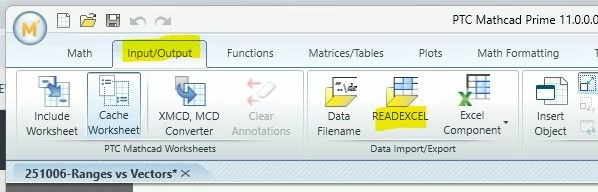
I also recommend the READEXCEL wizard on the ribbon that only takes a few clicks to import a matrix rather than a table from EXCEL.

Capture.JPG  

Cheers

Terry

2 replies

23-Emerald IV
October 6, 2025

Well, apparently in the conversion, the link between the Mathcad sheet and the Excell sheet was detached. The corresponding data was copied into a Mathcad matrix.

The wonderfull new functionality of Prime is that it, contrary to 'real'  Mathcad, does NOT provide a means to copy a range of cells from Excel over to the Prime sheet. Going from Mathcad to Prime there are a few improvements (Units in arrays, Solving Differential equations symbolically, and  Automatic labelling of units, to name all of them) but there is a lot of functionality lost, some of which gets repaired over time, but with the speed of development of Prime. A snail runs faster.


Success!
Luc


Ah, I stand corrected.

As @terryhendicott  indicates, it is possible to copy a range of cells over from Excel to Prime, but you can (only?) create a Prime table from the data, meaning you get one or more table columns where each column effectively defines a vector. As such you cannot copy a (2D) matrix over.

21-Topaz II
October 6, 2025

Hi

I also recommend the READEXCEL wizard on the ribbon that only takes a few clicks to import a matrix rather than a table from EXCEL.

Capture.JPG  

Cheers

Terry

3-Newcomer
October 7, 2025

Thank you for your kind advice! After trying the READEXCEL wizard, the problem was resolved.


21-Topaz II
October 6, 2025

Hi,

Can you please upload your Prime worksheet, the old Mathcad worksheet and Excel workbook.

I have tried to recreate the error but have not been able to do so,

Select the Excel adjacent cells, copy.  Select a vacant space in the Prime worksheet and paste.  You get an Input Table with no headers defined.  That is the column vector variables of the Input Table have no name.


Cheers

Terry