1-Visitor
April 27, 2016
Solved

Expression is to large to be calculated

  • April 27, 2016
  • 3 replies
  • 7029 views

Hello,

I am trying to write a programme in Mathcad Prime 3.1. I am using the programme to compute the global stiffness matrices of bars in a structural system (just a 6x6 matrix). However Mathcad is returning an error message saying that the expression is too large to be calculated (see attached image). Surely Mathcad shouldn't have any trouble with such an expression. It was outputting correct values until the 4th row at which point it started returning this message.

Has anyone encountered this before and know how to work around it?

Cheers,

Mike

Best answer by Werner_E

I just grabbed a machine with P3.1 and played with your file.

In my opinion its clearly a bug and you may consider reporting it (if you are under maintenance)

I set i:=1 for test purpose and your 6 x 6 matrix still failed. This means, that the problem is not the vector of matrices but the matrix itself.

Also symbolic evaluation of the matrix throws the same error. This may indicate that the error occurs before any routine (numeric or symbolic) tries to evaluate.

I created a 6x6 matrix filled with 1's and evaluated it. Then I copied one expression after the other and for a while all was OK until about two thirds of the matrix was filled with your expressions. Then eventually after adding an additional expressions from your matrix, evaluation failed. It did not matter which expression I copied - its not a specific expression throwing the error. So there is nothing wrong with your sheet and your approach - its a bug in Prime.

It would be interesting to see if the same approach works in Mathcad 15 but I could not be bothered retyping the whole sheet and there is no way to convert the sheet.

So far the only workaround is to split your matrix in halves, generate it and then stack the halves together using "stack". interestingly enough this approach worked OK:
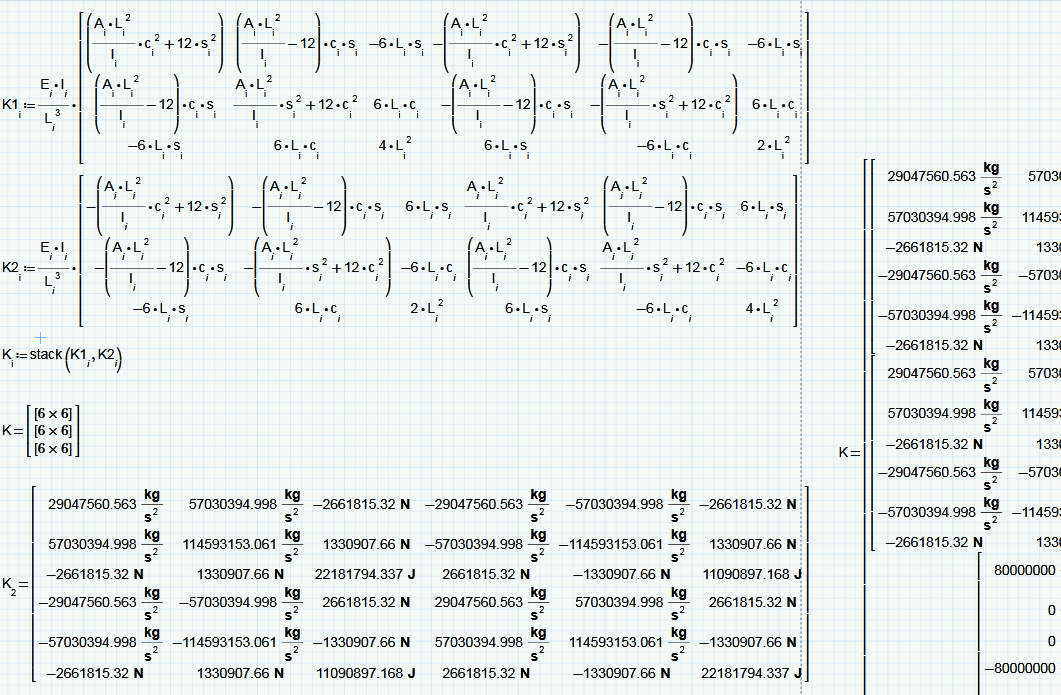
Regards

Werner

3 replies

25-Diamond I
April 27, 2016

Unfortunately I can't read 3.1 files (just 3.0) and so I don't see what you are doing.

But I guess you are using the symbolic solve command when you run in this annoying "the expression is too large to display..." problem.

Do you really need symbolic solutions? Maybe a numeric solve block would do the job as well with less troubles.

EDIT: Sorry - just realized that you attached a picture, not a worksheet. Its sure hard to debug a picture and we miss some information about the variables in play.

Whats the exact error message? Its probably not the one I had in mind when I typed the above answer.

Maybe you could post the sheet so someone with P3.1 can have a look at it.

Not sure if this may cause the problem you are experiencing, but I noticed that some of the indices "i" are in italic, some are not. So I assume they are labeled differently.

Do you have a second range defined somewhere above using an italic "i" ?

When I assume that A, I and E are also vectors of scalars, it looks like you simply expect K to be a vector consisting of 3 (n.b seems to b 3 in your screenshot) 6 x 6 matrices and you are right - this should not be a problem.

WE

mbeaumont1-VisitorAuthor
1-Visitor
April 27, 2016

"But I guess you are using the symbolic solve command when you run in this annoying "the expression is too large to display..." problem.

Do you really need symbolic solutions? Maybe a numeric solve block would do the job as well with less troubles."

I haven't used the symbolic solver at all in this worksheet, the error manifests upon simple assignment. You are right, a screenshot is not ideal, I will upload the native worksheet and a .pdf of the whole sheet tomorrow when I am at work.

"Whats the exact error message? Its probably not the one I had in mind when I typed the above answer."When I assume that A, I and E are also vectors of scalars, it looks like you simply expect K to be a vector consisting of 3 (n.b seems to b 3 in your screenshot) 6 x 6 matrices and you are right - this should not be a problem."

It's not, I've encountered that one plenty of times haha The error message is 'The expression is too large to be calculated'.

"Not sure if this may cause the problem you are experiencing, but I noticed that some of the indices "i" are in italic, some are not. So I assume they are labeled differently.

Do you have a second range defined somewhere above using an italic "i" ?"

I hadn't noticed this, I assumed it was just a quirk of Mathcads formatting as I generally havemy maths set to be 'un-italicised' but I think copy-and-pasting some expressions messes with this. Will investigate. As far as another 'i' range, there is no other defined outside of local block assignments.

"When I assume that A, I and E are also vectors of scalars, it looks like you simply expect K to be a vector consisting of 3 (n.b seems to b 3 in your screenshot) 6 x 6 matrices and you are right - this should not be a problem."

Correct, A, I and E are vectors (currently defined as 3x1's) so the computation of K should be a vector of 3 6x6's.

23-Emerald I
April 27, 2016

In previous versions on Mathcad (haven't gotten 3.1 yet) the in-line evaluation has often caused confusion.  Try not typing the evaluation equals "=" after the definition of c and s; that may solve you problem.  As Werner says, this should not be a problem.

mbeaumont1-VisitorAuthor
1-Visitor
April 28, 2016

Find attached a .pdf of the worksheet and a native .mcdx for prime 3.1.

19-Tanzanite
April 28, 2016

Unfortunately, I can't read a Prime 3.1 file, and I don't see anything in the pdf that would cause this problem (other than, perhaps, the different i subscripts noted by Werner). Try deleting one row (or column) of the matrix. If it still does not calculate, delete another, etc. See if you can get it to work with a smaller matrix.
