1-Visitor
November 4, 2017
Solved

Filter and extract data from a table

  • November 4, 2017
  • 2 replies
  • 3885 views

Hi to all

I have a table (table_data) that contains a large number of rows in which the coordinates of X, Y and Z of several objects named POLYLINE and LWPOLYLINE are found.
I need to extract the values of those coordinates, sort them in a table and indicate which belong to one object and which belong to the other.

To better understand what I want, I attached an example of what I want to do automatically, since I do it manually and it takes a lot of time.

In advance thanks for the help

Best answer by Werner_E

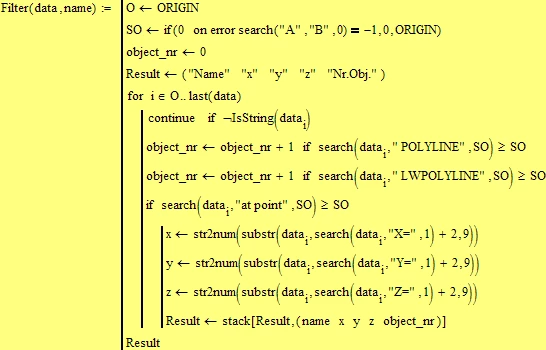
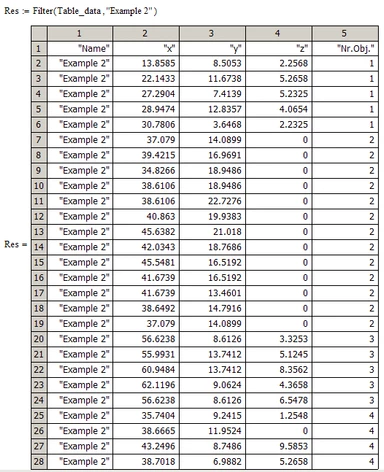
Here is a quick hack, assuming a well behaved data file (sorted, consistently formatted, ...as mentioned above) and without error checking, etc.

Bild1.png

Bild2.png

2 replies

24-Ruby IV
November 4, 2017
24-Ruby IV
November 4, 2017

Prime

FilterPrime-2.png

25-Diamond I
November 4, 2017

@BPP wrote:

Hi to all

I have a table (table_data) that contains a large number of rows in which the coordinates of X, Y and Z of several objects named POLYLINE and LWPOLYLINE are found.
I need to extract the values of those coordinates, sort them in a table and indicate which belong to one object and which belong to the other.

To better understand what I want, I attached an example of what I want to do automatically, since I do it manually and it takes a lot of time.


Hmm, it would also take some time to write the little parser you need and you would need some additionals informations like

.) are POLYLINE and LWPOLYLINE the only identifiers for objects?

.) Your write that you need to sort the data and indicate which belong to which object. Does that mean that the source data may be not sorted like the one you provided? Can it be that the points are scattered throughout the file and we have to look at the "VERTEX    Layer: " ????" " label for each set of coordinates to see which object that point belongs to.
.) is it for sure that every line with coordinates has the text "at point" in front?

.) can you guarantee that after "X=" etc. the number takes always up exactly 9 characters? Or can you run into a file with more or less precision, too? A fix number would make parsing easier of course.

....


@ValeryOchkov

Sorry Valery, but I really don't see how your two answers (with the way to huge pics IMHO) relate to the question and could help. Anything I am missing?

Werner_E25-Diamond IAnswer
25-Diamond I
November 4, 2017

Here is a quick hack, assuming a well behaved data file (sorted, consistently formatted, ...as mentioned above) and without error checking, etc.

Bild1.png

Bild2.png