17-Peridot
May 14, 2018
Solved

filterNaN weirdness

  • May 14, 2018
  • 4 replies
  • 6603 views

Hi,

I have a rather large matrix (1100 x 40) from which I tried to filter out the data that have NaN content, but to no avail.

When I searched for the problem in my code I found that the the filterNaN function sometimes didn't filter NaNs although the entite columns was filled with NaN. I tested this by checking whether the value is indeed NaN, which it is. Checking whether the same value is a scalar returned also a positive?!?  (see attache sheet which contains a subset of that data).

Does anybody have an explanation for this contradiction and/or can tell me how to avoid this?

Thanks

Raiko
Best answer by LucMeekes

Raiko,


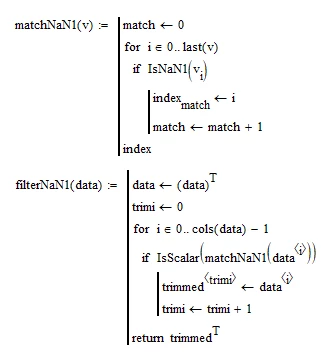
the following function definitions were in the Data Analysis Extension Pack 'electronic book' for Mathcad 11:


LM_20180516_NaNs1.png

(NOTE: Bad programming because not ORIGIN-aware.)

I added:

LM_20180516_NaNs2.png


Gives these results:

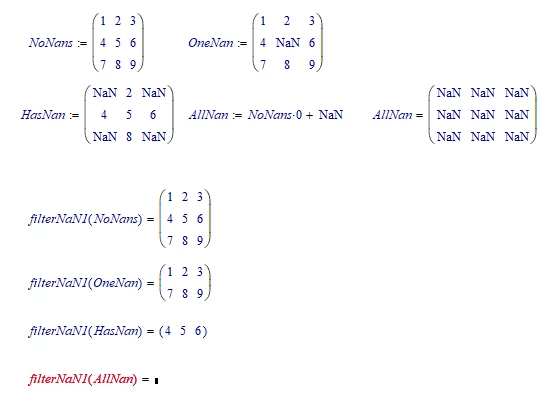
LM_20180516_NaNs3.png

Hope this helps. If yes, you can just override the Mathcad 15 internal definitions...

Attached is a mathcad sheet with ORIGIN-aware versions.


Success!

Luc

4 replies

1-Visitor
May 14, 2018

Two notes:

  • IsScalar(NaN) returns 1 (true), so I think this is unrelated to the filterNaN problem you are having.  Though, I agree it's questionable that Mathcad returns true here.
  • Please note that filterNaN removes all rows that have NaN in any of their columns.  Therefore, if you have a column of all NaNs, then the result will be empty.


If I create a set of data with a single column of NaNs, then filterNaN returns the error, "The resulting matrix contains no data."

If I create a set of data with a two columns of NaNs, then filterNaN returns the error, "These array dimensions do not match."


In trying to evaluate filterNaN(Q) with your data, I get the second error.  I assume this is only because you have two columns of NaNs.  Though, I believe the first error message would be more helpful.


Edit:

After further investigation, I've found several examples where filterNaN gives the error, "These array dimensions do not match." - even if you have some rows without any NaNs.

Raiko17-PeridotAuthor
17-Peridot
May 15, 2018

I'm aware that mathcad throws an error when all columns in a matrix are NaN and have dealt programatically with this (on error statement). However, this error also appears matrices where about 40% of the columns are NaNs.

Because I couldn't understand why Mathcad fails to filter for NaN I had a look at the data to check whether some of them are wonky. That's why I checked for NaN and Scalar. However, a matrix element can't be NaN and a scalar although Luc's idea that Mathcad probably only checks whether a variable is neither a string nor an array and from that judges that it must be a scalar is a good one I doubt it.

It seems I need to contact PTC.

Raiko

23-Emerald IV
May 14, 2018

Maybe Mathcad judges that an item is a scalar when it's 'numeric' (not a string) AND not an array.


Luc

25-Diamond I
May 15, 2018

I have no problem with the fact that Mathcad considers NaN a scalar. After all NaN is an expression we want to be able to apply mathematical operations on (like your division by 2) without running into an error. We see in the 3Dplot component what happens if NaN's are not considered numerical/scalar - the component throws an error.


On the other hand there sure is a bug in the filterNaN function. If I change your matrix Q so that at least one row does not contain a NaN I still get an error when trying to run it through filterNaN. This "array dimensions does not match" is the very error message we get when every row contains at least a NaN and the result would be empty.

As you can see from the attached screenshot the problem does not occur if I just use the first three columns of your matrix (I even tried addding the last column with success).

Still no idea what could cause that error, but it sure is a bug.

bild.PNG

Raiko17-PeridotAuthor
17-Peridot
May 15, 2018

Hello Werner,


on the perill of being called a stickler for accuracy I beg to differ. Calling a variable content "Not a Number"; i.e. it is neither integer, real nor complex and letting it to be handled as if it is one is a contradiction. even if this helps in 3D plots.

I've opened a call at PTC on the filterNaN issue. Let's see how long it takes.


Raiko

25-Diamond I
May 15, 2018

I see NaN as "something" which, while not being a number, still is an allowed argument wherever a scalar is allowed. Seen that way "IsScalar(NaN)=1" has some consistency.


I would not have high hopes for a speedy bug fix from PTC, but we'll see.

LucMeekes23-Emerald IVAnswer
23-Emerald IV
May 16, 2018

Raiko,


the following function definitions were in the Data Analysis Extension Pack 'electronic book' for Mathcad 11:


LM_20180516_NaNs1.png

(NOTE: Bad programming because not ORIGIN-aware.)

I added:

LM_20180516_NaNs2.png


Gives these results:

LM_20180516_NaNs3.png

Hope this helps. If yes, you can just override the Mathcad 15 internal definitions...

Attached is a mathcad sheet with ORIGIN-aware versions.


Success!

Luc

25-Diamond I
May 16, 2018

This is what I get when I recalculate your sheet with the current MC15. Obviously the function returns the unaltered argument.

Will have a look at it as to why later. Found it. Its your IsNaN1. Replace it by IsNaN ant filterNaN1 works OK.

FilterNAN1 shows the same behaviour

B.png

25-Diamond I
May 16, 2018

According your matchNaN:

a=NaN does not give you 1 even though a is assigned NaN


Replace "...if (Vv=NaN)" by "...if IsNaN(Vv)" and your filterNaN works OK, too.


Don't use IsNaN1, as otherwise matchNaN will return 0 all the time. 0 is scalar and so every row is included in the result matrix.

B.png