14-Alexandrite
November 19, 2020
Solved

Find() block with multi variables

  • November 19, 2020
  • 2 replies
  • 3267 views

To all,

Forgot how to do the following in mcad 15

I’d like to find the “best” possible (feasible) set of numbers (variables) to minimize an error. See attached

I am sure I have seen examples about similar problem but can’t find them right now. I'll start looking at setting up the problem but I thought I'll ask in the meantime

Does one have to set up a Given (Find) block with the possible equation(s)/inequation(s) or should a function be defined

Thanks

Regards

Best answer by Werner_E

@JXBWk wrote:

Thanks. After some trial and error I was just about getting there !

I have replaced the constraint "<= MaxMass" to be =MaxMass as it make more sense to "target" a mass as well as an inertia

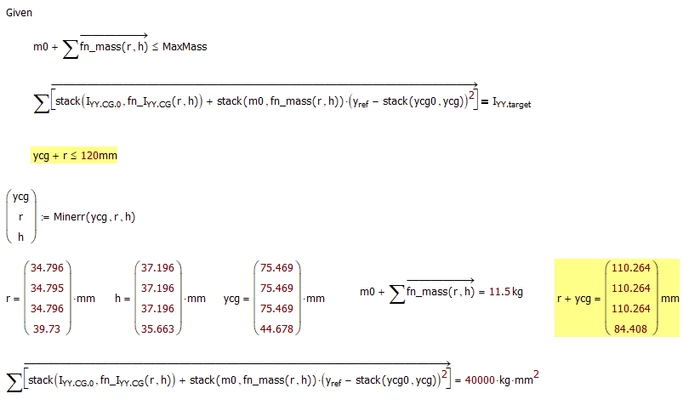
I haven't figure out how to put an "constraint" on a specific variable. for example I would like each ycg value to be less than 120mm or even better ycg[i <= 120mm - r[i


Forget about the range i inside of the solve block!

That additional constraint seems to be easy, even though I am not sure why Mathcad accepts a constraint formulated like this as we have a vector on the LHS and a scalar on the RHS. I would have expected an error, but obviously it works OK:

Werner_E_3-1605874763896.png


2 replies

23-Emerald IV
November 19, 2020

Before looking at your file:

Check the built in help, it comes with examples.

Yes, you 'll probably want to use a solve block, and the Minerr function. Or Minimize...


Success!
Luc

25-Diamond I
November 19, 2020

You calculate the sum of I.YY.CG and compare it with I.target.

Shouldn't it be the sum of I.YY.shift?.


You have only one equation and one value as a target and so many variables to play with!

Not sure if thats what you are looking for, but Mathcad finds that its only necessary to change one of those many variables (lyy.cg.5) to get a perfect result.

Werner_E_0-1605804821786.png


JXBWk14-AlexandriteAuthor
14-Alexandrite
November 19, 2020

Thanks. Indeed copied-pasted the wrong variable

Get perfect results because the values were entered to be so - to start with

It's because I have so many variables that I am not sure how to proceed

strictly speaking if change m then the related Iyy.CG must change (if you change the mass of a cube (by changing it's dimension then its inertia changes) - this introduce an extra 3 variables but 1 thing at a time

I manged to set your kindly provided example and will start playing with. You'll find that in your example/test, mcad does indeed seem to change only 1 of the variable 

23-Emerald I
November 19, 2020

It's because I have so many variables that I am not sure how to proceed


Time to remember some basic algebra:  You need as many equations as variables you're solving for, or the problem is not sufficiently constrained.  If you have more equations than variables the problem is over constrained.