
1-Visitor
November 20, 2013
Solved

Find() gives solution outside the constraints

  • November 20, 2013
  • 6 replies
  • 11272 views

Hi all,

I have a solve block as follows in MathCAD 15.0:
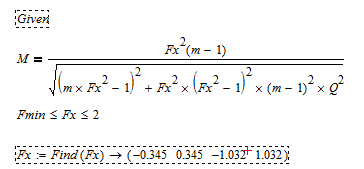
SolveBlockProblem.PNG

m=6

Fmin=0.469

Q=0.35

I included the constraint line to limit the solution to within the range of 0.469 to 2, but I do not understand why I would get solution which is outside this range, such as 0.345 and the negative numbers.

Could someone please help?

Thanks!

-Alan
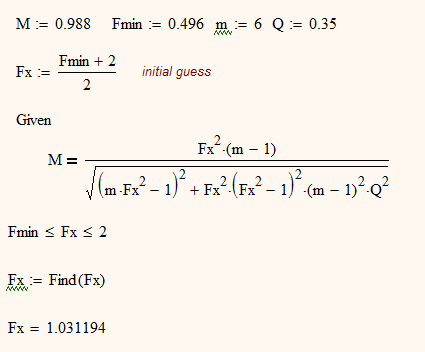
Best answer by AlanStevens

Is there any reason you must use the symbolic solver? Numerically, you get what you want right away:

Fxsolveb.PNG

Alan

6 replies

24-Ruby IV
November 20, 2013

Use please not the Find function but the solve operator with constraint keywords.

One example:

1b-Triangle.png

24-Ruby IV
November 21, 2013

Valery Ochkov wrote:

Use please not the Find function but the solve operator with constraint keywords.

Find -> not work in Prime

25-Diamond I
November 21, 2013

Find -> not work in Prime

Yes, unfortunately we cannot evalauate a solve block symbolically in Prime.

But Alan clearly stated that his question relates to Mathcad 15.

23-Emerald I
November 20, 2013

Two things:

  1. Fx is never seen in the equation, only as a square. So you can reduce the complexity of the problem
  2. You never specify M

Having said that, there's a fairly small range of M for which you can find a solution:

25-Diamond I
November 20, 2013

For future questions please attach your worksheet!

You didn't reveal the value of M and this is exactly vital as you will see.

Mathcad symbolics quite often has its problems with constraints being inequalities, but in your case thgis seems not to be the problem.

There is nothing wrong with the solve block.

Your problem seems not to be that Mathcad is not following your constraint but that your solutions are complex numbers with a very small imaginary part. Thats why a comparison with real numbers in size does not make sense. You don't see this because you had set up to display 3 decimals places only.

See the attached sheet for further details. I guessed the value of M from the solution values you showed and only a very slight modification of M yields real values and then Mathcad respects your constraint.

FindSolutions.png

1-Visitor
November 21, 2013

Great find!

I will then use Re(Find(Fx) to get only the real part of the numbers.

However, afterwards, how can I filter the numbers which are not in the constrained range away from the resulting vector?

Say I have the following now

Fx_real=(-0.344 0.344 -1.056, 1.056)

and the constraint is still Fmin<Fx_real<2

How do I remove the numbers that are not in the range?

1-Visitor
November 21, 2013

Hi all,

Thanks for the quick reply. It seems like I forgot to include the M value.

In the case, M=0.988.

19-Tanzanite
November 21, 2013

By rearranging the equality a little you can do the following:

Fxsolve.PNG

Note: this doesn't work using the original formulation of the equality.

Alan

1-Visitor
November 21, 2013

Great alternative approach. Thanks! But I would really like to find a way to keep the original formulation. The main reason for me to use MathCAD instead of other software is because of the high readability of the worksheet.

1-Visitor
November 21, 2013

Is there any convenient way in MathCAD to filter the numbers outside of the specified range from the vector?

Fx_real=(-0.344 0.344 -1.056, 1.056)

and the constraint is still Fmin<Fx_real<2

19-Tanzanite
November 21, 2013

Is there any reason you must use the symbolic solver? Numerically, you get what you want right away:

Fxsolveb.PNG

Alan

1-Visitor
November 21, 2013

No particular reason, and thank you! I think this is the problem I was having.