1-Visitor
September 30, 2021
Solved

For loop and matrices

  • September 30, 2021
  • 3 replies
  • 7932 views

Hello. I am looking for some assistance with for loops and matrices within Mathcad. I have a relatively basic knowledge of mathcad so this may be a straightforward solution.


I am trying to return a value for m11 for each of the sigma(11) values. However, the way i have it set up, it only returns the m11 value when i = 2. 

I know i could list the equation out 3 times, changing the "i" with 0, 1, and 2 each time; however i had thought i may be able to do the same thing using the for loop function.

Thank you.
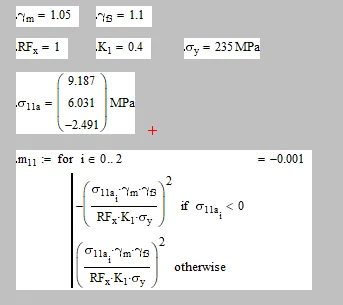
FC_10063827_0-1633003230333.png


Best answer by LucMeekes

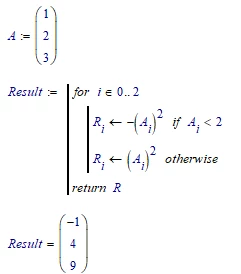
A Mathcad program returns ONLY the value of the last statement executed. That's why you see a single element instead of an array.

Here's what you could do (simplified):

LucMeekes_0-1633013630509.png

(I could have typed just R, instead of return R, but it makes clear what result the program should return. Note that a return statement put anywhere in the program makes the program stop there and return the argument of the return. So you can put it in a IF statement if you need to stop the program in the middle of a loop.)

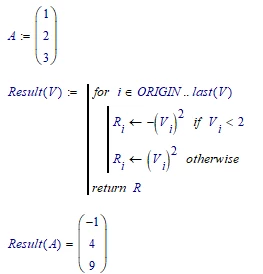
But in general I prefer to define a function (prevents strange things happening when the FOR loop gets out of sync with the length of the array):

LucMeekes_1-1633013814179.png

A word of advice: refrain from evaluating a definition (that is, do NOT put an = immediately following a definition, like you did with m.11). First define                        m.11 :=  ....

Then, on a separate spot, evaluate it with      m.11 =

Yes, it works (most of the time), but occasionally it creates problems.


Success!
Luc

3 replies

LucMeekes23-Emerald IVAnswer
23-Emerald IV
September 30, 2021

A Mathcad program returns ONLY the value of the last statement executed. That's why you see a single element instead of an array.

Here's what you could do (simplified):

LucMeekes_0-1633013630509.png

(I could have typed just R, instead of return R, but it makes clear what result the program should return. Note that a return statement put anywhere in the program makes the program stop there and return the argument of the return. So you can put it in a IF statement if you need to stop the program in the middle of a loop.)

But in general I prefer to define a function (prevents strange things happening when the FOR loop gets out of sync with the length of the array):

LucMeekes_1-1633013814179.png

A word of advice: refrain from evaluating a definition (that is, do NOT put an = immediately following a definition, like you did with m.11). First define                        m.11 :=  ....

Then, on a separate spot, evaluate it with      m.11 =

Yes, it works (most of the time), but occasionally it creates problems.


Success!
Luc

1-Visitor
October 12, 2021

Thank you for providing this. Very useful information to know for the future. Managed to make both work for my problem too

14-Alexandrite
September 30, 2021

two other possible ways ...

1-Visitor
October 12, 2021

Thank you for this. Capture 1 works best for me as it was very similar to how the actual calculation I have was laid out.

23-Emerald V
October 1, 2021

For those who have similar problems but only have Mathcad Prime Express, here are a few other ways around using programmed for loops.  They work in Mathcad Prime Express 7 and should work in earlier versions.


2021 09 30 A.png


2021 09 30 B.png


2021 10 01 B.png


2021 10 01 C.png


Stuart