1-Visitor
October 12, 2013
Solved

Function / Condition Issue

  • October 12, 2013
  • 1 reply
  • 4969 views

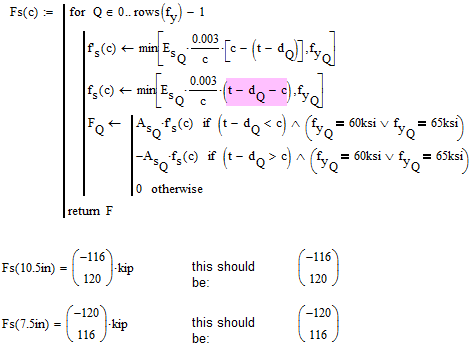
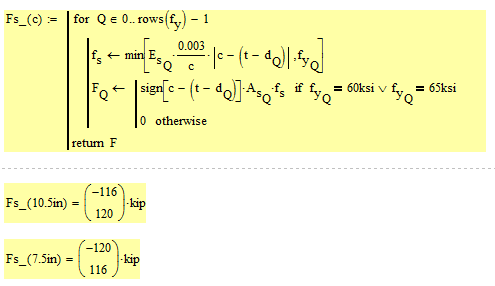
I am having an issue getting a function to produce the results I expect. I am not sure if it is an issue with one of my conditions or the function syntax itself. When I check pieces of the function, I get the expected results, but not when it is all together. I have attached a worksheet with the function that is not working. Any help would be greatly appreciated.
Best answer by Werner_E

Could it be that it should read "t-d[Q-c" instead of "d[Q-c"? So your function should be

12.10.png

If this is the case, then it could also be written as

12.102.png

Would the output be realistic?

12.103.png

1 reply

25-Diamond I
October 12, 2013

Your function at the top is OK. Its the functions Fs(c) below which are wrong. They will only return the value for Q=1 and ignore Q=1.

12.10.png

BTW, no need to make f() and f'() functions of c. As you use them only once it would suffice to make them simple variables (simply omit the "(c)").

1-Visitor
October 12, 2013

Thanks for the reply. I am trying to get the top F function to equal what I had below. Fs(10.5in) should equal (-116 120). Is there another constraint I need on the fs and f`s values?

I can see now where it is getting the values from, but I am still having trouble getting the function to yield the results I want.

25-Diamond I
October 12, 2013

As already written your functions below fully ignore index 0 in the vectors E.s, d and f.y. In other words, the calculations in Fs are made for all values in those vectors, but the return value is just that of the last index. So it would not make sense for those variables to be vectors at all.

If you want to duplicate the results you achieve with your calculations below, you can do so by simply replacing all indices Q by 1 (the last index) in the definitions of f.s and f'.s. This would duplicate exactly what you have below, but I can't imagine that this would be correct.

BTW, there is no need to get rid of the units in your routine.