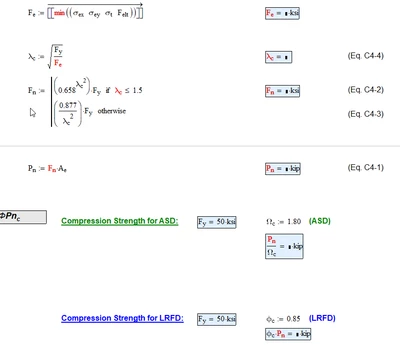
There are some functions in operators which can't be vectorized. "min" is such a function. Furthermore you provide a nested matrix (1 x 4 consisting of 3 x1 vectors) as argument and vectorization would try to unravel the outer matrix as well.
There are three ways around this problem, I could think of:
1) Use a worksheet range variable to select the individual vector elements and apply the calculations to them:
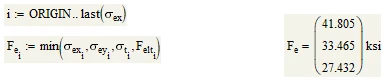
Of course you simply could use i:=0..2 if you are sure that ORIGIN is set to 0 and there are only three elements in the vectors.
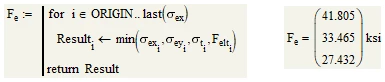
2) Same calculation as 1) but turned into a small program to avoid having to define a range variable (this would be my preferred option)
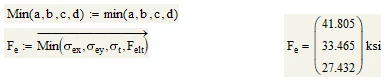
3) Define a user function (I used Min() with a capital "M" as function name) which then can be called vectorized:
You will experience a similar problem when calculating F.n because comparison operators like <= also can't be vectorized. Again you have the same three options as before (here I'd go for #3 but the choice is up to you):
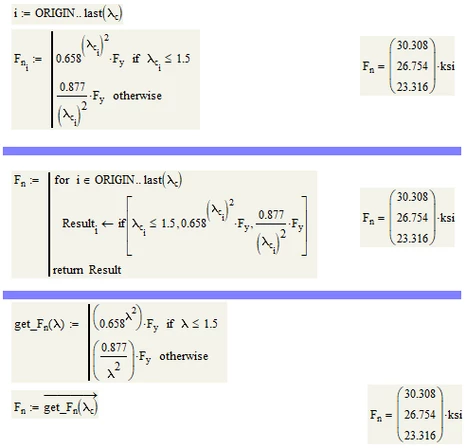
BTW, there is no special reason for choosing the if-function instead of the programed if-statement in the second option. Just for variety 😉
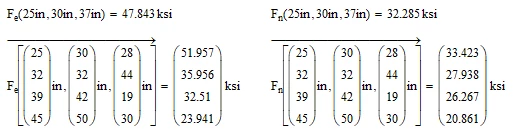
A generally different solution could also be to change the basic setup of the sheet. By this I mean that you don't immediately calculate the values but rather turn the calculations into functions depending on the input values L.x, L.y and L.z.
Then you can define the vectors L.x, etc. later and call those functions vectorized.
Its more work and may not look that intuitive, but an additional benefit is that you can very easily calculate results for different input values and compare them:
One last remark: Its not necessary to define the units ksi and kip. They are already predefined in Mathcad.