
13-Aquamarine
January 14, 2026
Solved

Grafical analysis of the curve build with the predefined equation

  • January 14, 2026
  • 1 reply
  • 93 views

Dear PTC community!

This topic is a continuation of the  "Symbolic solver unit conversion with further substitution" thread.

The idea for the improvement is to analyse the bending moment M (bearing capacity) as a straightforward function of different areas and reinforcement grades.

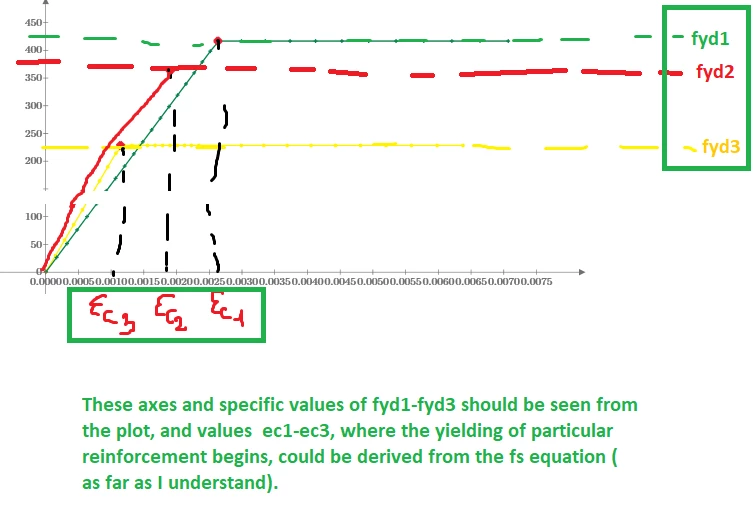
Thus, I want to explore how varying the reinforcement level, area, and yield strength affects the moment M for a specific reinforcement stress value at a fixed strain, for instance, the 0.2ecu1 level.  

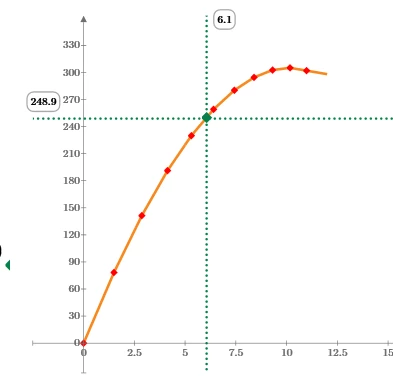
I thought that for such a purpose, the additional axes (fyd_n for each reinforcement grade) plotted with dots, whatever, would be useful with both horizontal and vertical axes (stress-strain for each reinforcement grade) in the form of "sights" as in the @Werner_E  file, as follows:
Ivan_Pat_0-1768413999537.png


The possible representation of the aforementioned could also be as follows:
Ivan_Pat_1-1768413999538.png


I found that the technique of plotting the dot lines for specific values of fyd can be used from the other file (see @Werner_E file, where, instead of Moment-Curvature, I would like to use Stress-Strain diagram). This is the idea. I tried to modify it with my data, obtained courtesy of you and @Werner_E.

I'll be very grateful for any advice, recommendation or assistance with the issue.
 

Best answer by Werner_E

OMG, the sheet was a really wild mix - some calculations assumed ORIGIN=0, others ORIGIN=1. This can't work of course.

I changed the sheet so that it works with ORIGIN=0. You have to check if the results still are as they should be.


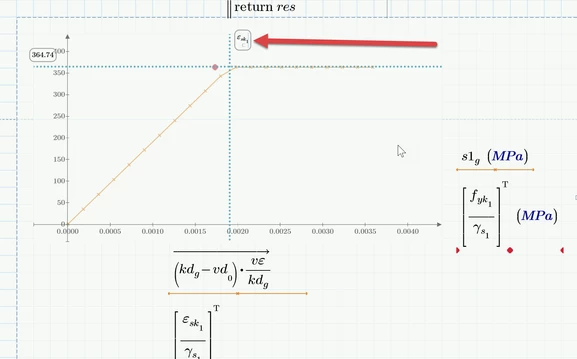
According the markers - you simply write the variable name in the placeholder instead of a constant numeric value. That's all there is to do. In case of units you must make the expression unitless by dividing by the appropriate unit.

I did not know which variable you would like for the horizontal marker, but here it would be necessary to divide by MPa.

Werner_E_2-1768504556301.png

As already written in my first answer, you only see the variable name if you highlight/click the legend placeholder, otherwise you see the numeric value.

Prime 11 sheet attached


1 reply

25-Diamond I
January 15, 2026

Its not clear to me what the question is.???

I opened your DBN v7 file and noticed just two things:

  1. the sheet obviously was written with a setting of ORIGIN=1 in mind, but uses the default ORIGIN=0. Easiest way to fix is to set ORIGIN to 1 - either via the menu ("Calculation"-"Worksheet Settings") or by writing ORIGIN:=1 somewhere at the top of the sheet.
  2. if you want us to be able to play around with your sheet, you would also have to provide the two data txt files

In the other file I just noticed that you have written the value 248,9 in the place holder for the horizontal marker. You should write

Werner_E_0-1768462163721.png

there in the placeholder. That way you get the correct value (which is 250) and the marker will change if you change the value of the variable M_fact.

When you do so, you will see 250 written in the label for the marker. Only if you click on that label you will again see the actual expression M_fact/kJ.

Werner_E_1-1768462433539.png   Werner_E_2-1768462445409.png


Ivan_Pat13-AquamarineAuthor
13-Aquamarine
January 15, 2026

Hi Werner!

Sorry for being misunderstood. I'll try to point out what exactly I'm seeking.

So, your remark is absolutely correct


  1. the sheet obviously was written with a setting of ORIGIN=1 in mind, but uses the default ORIGIN=0. Easiest way to fix is to set ORIGIN to 1 - either via the menu ("Calculation"-"Worksheet Settings") or by writing ORIGIN:=1 somewhere at the top of the sheet.

I tried to change the ORIGIN to 1, but MathCAD gave the error message 

Ivan_Pat_0-1768496817278.png

And the worst part is that I have no idea what the point is or why it doesn't correct.

I thought the possible problem was the index value in the bottomcase of REO steel_n and tried substituting other values (3, 4), but it still had the same error. So I left it as is with ORIGIN = 0.

In my query, I only asked for the possibility to build the extra horizontal and vertical dot lines where the yield of each reinforcement takes place ( for the case of multiple reinforcement layers, in my case, there are three layers ( steel 1, steel 2, and steel 3, respectively).

For clarity, I used  in my file only one layer of reinforcement 

Ivan_Pat_1-1768500132785.png

Thus, in the stress-strain  plot, I do want to plot (make it plotted automatically) one vertical and one horizontal dot axis at the strain value epsilon_s  (X-axis), where the reinforcement yields (e.i, has the stress value equal to fyd), (as in the picture). As it was previously mentioned, the idea was taken from your file (@Werner_E

Ivan_Pat_3-1768500668277.png

This is the original plot, where the two vertical axes are automatically fit to the c1 and c2 curve values, but the horizontal axis isn't fit to the Moment M, unfortunately.

Ivan_Pat_4-1768501173378.png


I pick both files again,  as well as "DBN" and "REO" txt files.


25-Diamond I
January 15, 2026

Your combo box for the steel selection returns values from 0 to 4 which you later use as matrix index.

Werner_E_0-1768503180281.png


When you set ORIGIN to 1, zero is an invalid index. So either rewrite the file to use ORIGIN=1 or you change the combo boxes to return values starting from 1.


Here are the changes necessary for ORIGIN=0

Werner_E_1-1768503587735.png

I am not absolutely sure but I guess that the column indices highlighted in red already assume ORIGIN=0. You'll have to now.