1-Visitor
July 29, 2014
Solved

Help!Can't use WRITEEXCEL function in for-loop

  • July 29, 2014
  • 5 replies
  • 2901 views

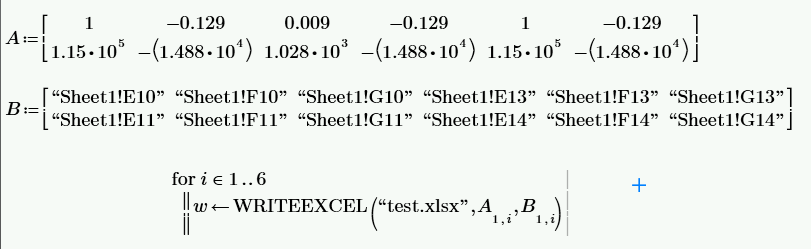
My Worksheet is like this:

test.png

I get two matrix:A and B.

A contains some numbers.B contains some strings that indicate certain blank which numbers in A should be put into.For example,A_1,3=0.009,so 0.009 should be put into Sheet1!G10(=B_1,3) in test.xlsx.

I use WRITEEXCEL function to achieve the goal but find it didn't run in for-loop.I still try other write-file functions such like WRITETEXT in for-loop and find none of them work.

Is it a bug?

Any one can help?

PS: I use Mathcad Prime 3.0 F000

PS:ORIGIN=1

Best answer by Werner_E

Haven't started up Prime but I guess your loop is not executed because the program sequence is not evaluated or assigned. So assign the sequence to a dummy variable like dummy:=for.... or add an evaluation = after the seqeunce.

An even better and more versatile idea would be to turn the sequence into a function in A and B.

5 replies

Werner_E
Werner_E25-Diamond IAnswer
25-Diamond I
July 29, 2014

Haven't started up Prime but I guess your loop is not executed because the program sequence is not evaluated or assigned. So assign the sequence to a dummy variable like dummy:=for.... or add an evaluation = after the seqeunce.

An even better and more versatile idea would be to turn the sequence into a function in A and B.

1-Visitor
July 29, 2014

So much thanks!!!

Your answer is quite useful.

Excuse me,I am a newbie.Could you explain how to turn the sequence into a function in A and B?

Werner_E
25-Diamond I
July 29, 2014

Sherwin Zhang wrote:

So much thanks!!!

Your answer is quite useful.

Excuse me,I am a newbie.Could you explain how to turn the sequence into a function in A and B?

You simply define

Write(A,B):=for.....

and Write is an arbitrary name of your choice.

Later, wehn you want to use/call that function use something like

dummy:=Write(X,Y) // remark: you can use variable names A and B, but you must not

or

Write(X,Y)=

Maybe even better to make the file name a function argument and maybe even the name of the sheet (it must exist!). See attached file.

What exactly are you trying to do? You are aware that using WRITEEXCEL you may not only write one cell at at time but a whole rectangular matrix of values?