
1-Visitor
December 2, 2013
Solved

Help needed to automatic select a value for solve block?

  • December 2, 2013
  • 19 replies
  • 6540 views

Hi,

I am very new to Mathcad. I have a solve block for a quadratic equation. So i have 2 roots, and i want it to be automatic select to be one of it.

it somehow said the variable is undefined. Really appreciate if someone can help me out. Thanks.
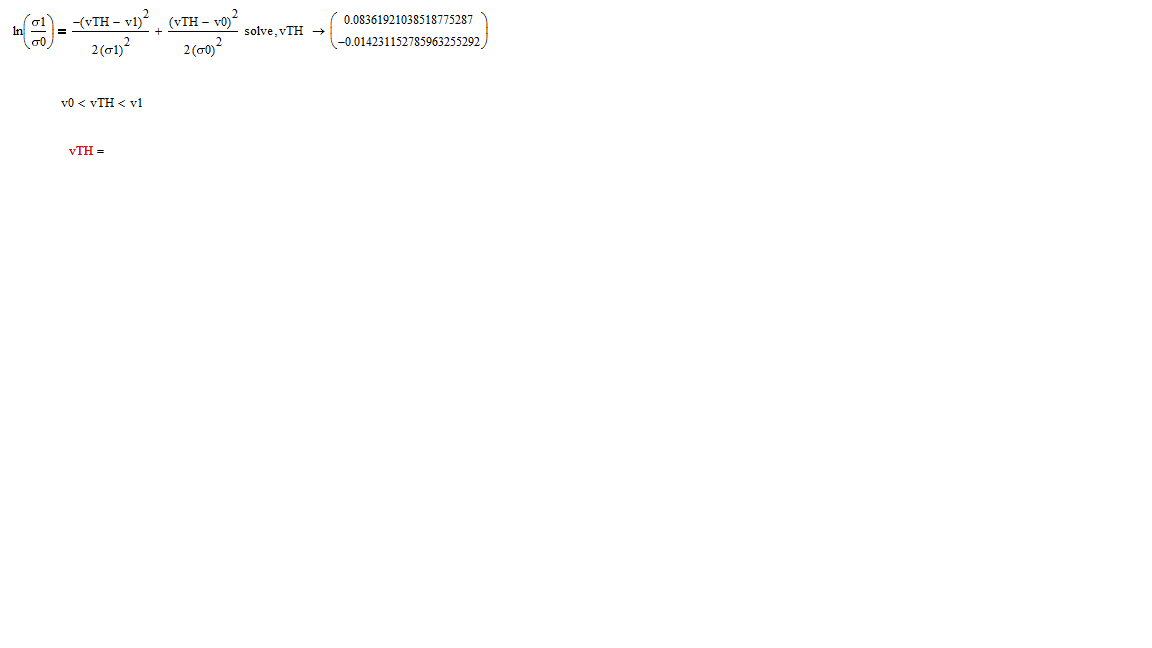
1.png

Best answer by ptc-5342779

Hi Werner,

Now i finally get some idea on assigning the solve solution to vTH, but when i try to use the assume method, it said its illegal assume constraint.

The Given and Find method is working just fine, but i don't want to use a guess value, i want it to find the one root that fit within v0<vTH<v1 directly.

The assume method seems great if it can work out.

Attached with my worksheet.

19 replies

19-Tanzanite
December 2, 2013

To the left of ln(sigma1/sigma0) put VTH:= (i.e. colon equals) this will assign the result to VTH. You can select the appropriate solution using VTH[0 or VTH[1 as required.

Note: It is better to upload a worksheet rather than just an image (use the advanced editor to do this - top right of edit box)

Alan

1-Visitor
December 2, 2013

Hi Alan,

But once i change the = to := , it's not applicable to use solve-> anymore, I attached my mathcad as below.

Another thing for the selection of vTH, at first i thought like a matrix vector, so i put like vTH0 and vTH1 but it doesn't work like a matrix in solve block.

Thanks.

Werner_E
25-Diamond I
December 2, 2013

Look if some of th attched helps. I can't tell as yout sheet won't work withoud the referenced data file.

Werner_E
25-Diamond I
December 2, 2013

To automatically chose the solution fitting your constraint you may try the "assume" command.

But as you are expecting numerical results you may also use a solve block with "Find" where you can put your constraint in a natural way.

For further help - attach your worksheet.

1-Visitor
December 5, 2013

I have a solve block that find the roots of quadratic equation in complex form, And the assume function cannot distinguish which one to select if it's in complex form. I try to use assume for modulus so that i can have an absolute value, but it does not work like that. Is there any other method to tell the solve block to change the answer to an abosolute value automatically without giving me the complex form? Attached with my worksheet.

Werner_E
25-Diamond I
December 5, 2013

Which one would you like to select? Complex numbers are not in order, you cannot compare them for size.

1-Visitor
December 5, 2013

I want to select the -0.02185645369468207621+0.00025256616676468628262i as the absolute value of this is within the v0<vth<v1. This is why i try to change the solve block to have roots in absolute value so that it can fit the assume range. The other root -0.9 is out of the range which should be neglected.