
1-Visitor
February 2, 2011
Question

Help Search Button

  • February 2, 2011
  • 3 replies
  • 6117 views

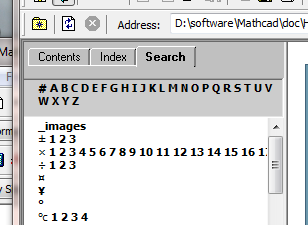
I am Using mathcad 15 in a Windows 7 OS. My search button under "help" doesn't give the option to search for a function or anything, it only provides me with the letters of the alphabet. should it be like this? if not please help, I have tried to repair mathcad but it didn't seem to work.... PLease HelpUntitled.png
3 replies

1-Visitor
February 2, 2011

I have never seen that before. Have you tried the index tab?

Mike

http://communities.ptc.com/servlet/JiveServlet/showImage/2-149416-2532/bar_anim.gif

1-Visitor
February 3, 2011

Hi

Thanks for your reply, Yes I have and it looks the same. Is there some way i can get hold of the help folder's content?

1-Visitor
February 3, 2011

You could try repairing your installation.

Mike

http://communities.ptc.com/servlet/JiveServlet/showImage/2-149416-2532/bar_anim.gif

1-Visitor
August 16, 2011

Solved the problem PTC phoned me and after a long chat with the people we decided that if you open help it gives you a URL directory cope that adress and paste it into your inter browser...

24-Ruby III
August 16, 2011

Hello!

You need to use Mathcad help within the program ("Mathcad Help" key F1), rather than calling it through Internet Explorer.

Mathcad Help.jpg

1-Visitor
August 16, 2011

Thank you... but as you can see from the first post my help doesn't work, and don't say that I should try and re install it because I did that a hundred times..

so if there's people out there with the same problem a solution is to use your inter browser to open the help URL...

24-Ruby III
August 17, 2011

Well, if "Mathcad Help" does not work in the program itself, in this case, it is necessary to contact with technical support PTC, creating a new case, here: http://www.ptc.com/appserver/cs/case/case_logger.jsp

P.S. I think that in this case a problem with Windows 7. As an alternative solution - to use the installation CD with Windows 7, run the installation of the system and then select update (but not a full installation of the replacement of the current system).