16-Pearl
June 8, 2026
Solved

Help with MATHCAD 15 solve block

  • June 8, 2026
  • 6 replies
  • 60 views

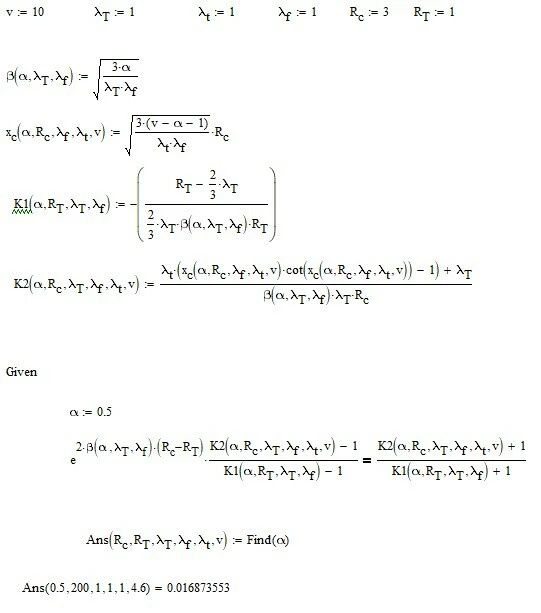
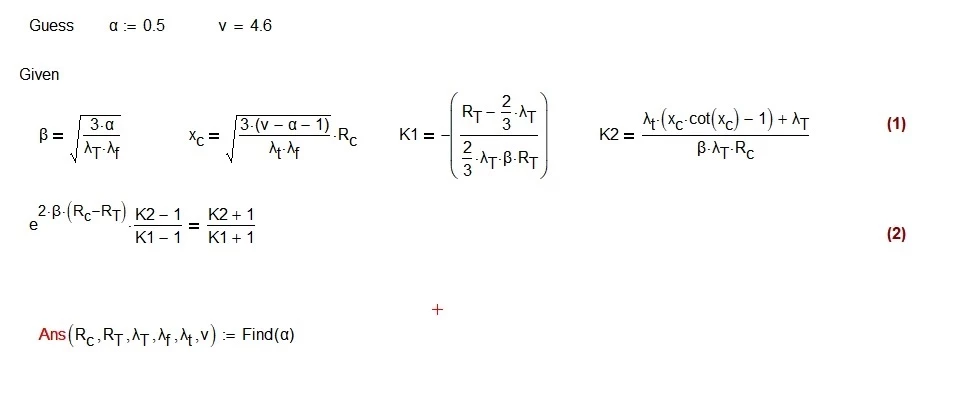
Attached are two images of my solve block.

The example in screenshot 192200 does not work.  🥴  I am trying to define functions to be used in the equation to be solved.

The example in screenshot 192321 DOES WORK.😀  I have explicitly put the functions into the equation to be solved.

NOTE:  I cannot define the functions with the MATHCAD:= because I later use the solve block to compute a series of 𝛼 for a series of the parameters inside the Ans(….).

Is my non working example simply not possible, or do I have some syntax or logic error?


Thanks for any help.

Reg


Best answer by terryhendicott

In the first solve block it has 5 equality equals where it needs function definitions so only one equation for one unknown.  Error is both syntax and logical. Define the functions required before the solve block leaving only one in the solve block.

Cheers

Terry

6 replies

21-Topaz II
June 8, 2026

In the first solve block it has 5 equality equals where it needs function definitions so only one equation for one unknown.  Error is both syntax and logical. Define the functions required before the solve block leaving only one in the solve block.

Cheers

Terry

23-Emerald I
June 8, 2026

I may be missing it, but I don’t see where the highlighted parts get into the non-working parts.


regcurry16-PearlAuthor
16-Pearl
June 8, 2026

Fred,

I use this as a function to call later.  It’s not the usual use for solve blocks; however, it does work.

Here is a YouTube example.

Solve block as a function


Reg

25-Diamond I
June 8, 2026

Let me say first that you always should attach your worksheet or a simplified worksheet showing the same problem. Hats off to Terry for being willing to retype everything shown in the pictures.

The example in screenshot 192200 does not work.  🥴  I am trying to define functions to be used in the equation to be solved.

  1. The picture numbers/names you see before you attach a picture gest lost when you attach it - we don’t see it. But in your case its clear to which picture you refer to.
  2. Main problem, as Terry already mentioned, is, that you did NOT define functions! You introduced some new variables (like beta, ...) which are undefined - hence the error.

There are three ways to fix this.

The first which you found yourself is to do without those abbreviations and just use the full expressions using only the input values. However, this approach comes at the expense of clarity.

The second approach was shown by Terry. Define actual functions for the expressions you want to abbreviate. These functions must, of course, take the input values as parameters. You can either use every time all six for convenience, or, as Terry did, use only the ones that are truly necessary.

The third way treats the new variables as variables and not as functions. You can use what you have already typed as it is but you must provide guess values for these new variables and put all of them in the “find” function. This means you are not only solving for the one variable alpha but for the four new variables as well, even though you might not be interested in their value.

That way you function would always return a vector of  five values and it may be a good idea to define a new function which only returns the first value (alpha) of this vector.


Here a simplified example showing all ways:

Here is what you tried. It fails because E and also F are unknown and not defined.

Now we can do as you did and avoid using abbreviations

Doesn’t look so bad in this simplified example but sure does with more complex expressions as in your example.

Now the way where we define functions (in front of the solve block). I use all four possible input values x,a,b,c as function arguments in all functions even though those would not be necessary. But when I use the functions, I don't have to think about which variables to pass as arguments or in what order. The downside is that this makes the expressions a bit longer. (OK, c is not necessary as argument in either function in my example - but it could be ;-) )

And here the last way to fix your problem. Treating the abbreviations as variables and solving for them as well.

Hope this helps, the choice is now yours.

regcurry16-PearlAuthor
16-Pearl
June 8, 2026

Thanks to both Terry and Werner.  There should be a way to give both credit for best answer.  I will try that; however, it will require some significant changes to my MATHCAD file.


I have attached a zip of the MATHCAD file.  It’s been awhile, so I didn’t realize I could not upload the MATHCAD file directly.  I have also included a PDF of the MATHCAD file.


I will try to move the solve block down to the location noted in the PDF.  Then, everything will be defined above the solve block.  NOTE:  All the functions in the Ans(argument) will be vectors.  If that will cause a problem, let me know.


Thanks again for all your help,


Reg


25-Diamond I
June 8, 2026

As long as all arguments of your function “Ans” are either vectors of equal size or scalars (like ny) I see no problem in calling “Ans” vectorized as you already did.

According giving credit for the ‘best answer’ - don't worry too much about it! Terry definitely provided a correct solution, and he was also the first to do so and included a working spreadsheet. It's therefore entirely justified to mark his answer as the best one.

Ultimately, this highlifgting serves primarily to make life a little easier for forum users who search the forum later because they have a similar question, so they don’t have to plow through the entire thread.

I hardly think any of us places much importance on the ranking done here in the forum, which is (presumably) also influenced by the upvotes.

As Terry already provided a sheet using the functional approach, here is the version using multiple variables to search for. It was necessary to make beta (which has dimension length^-1) unitless by substituting it with beta/meter because Mathcad would not not accept a vector with mixed dimensions as the function result.


regcurry16-PearlAuthor
16-Pearl
June 9, 2026

Thanks much.