
1-Visitor
May 7, 2013
Solved

How can one choose the last column of a matrix?

  • May 7, 2013
  • 5 replies
  • 2640 views

I have a matrix that might change size in every particular run and I need the program to automatically plot the last column versus some other variable.but I cant choose the U<no. of column> command since I don't know how big my matrix is gonna be this time

Best answer by Werner_E

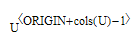
Use

UCols1.png

or if you changed ORIGIN you should use

Ucols2.png

5 replies

1-Visitor
May 7, 2013

Use the cols() function.

Werner_E
Werner_E25-Diamond IAnswer
25-Diamond I
May 7, 2013

Use

UCols1.png

or if you changed ORIGIN you should use

Ucols2.png

1-Visitor
May 8, 2013

Another approach. Overkill I know but couldn't resist. At least you know have the ability to extract rows from Matricies.

Clipboard01.jpg

Mike

Werner_E
25-Diamond I
May 8, 2013

To complete it add an additional transpose at the end.

Overkill? 🙂 Think we have a new example to explain what an euphemism is

The transpose-column extract-transpose way work pretty well, but with large matrices an in side a loop it gets terribly slow. Generally its surprising that the built in matrix routines are much slower than self written routines using for-loops - especially augment and stack. One would expect the opposite. This was discussed and timed in an older thread and really was astonishing.

1-Visitor
May 8, 2013

Werner Exinger wrote:

To complete it add an additional transpose at the end.

Overkill? 🙂 Think we have a new example to explain what an euphemism is

Sorry, was a little lazy of me.

The transpose-column extract-transpose way work pretty well, but with large matrices an in side a loop it gets terribly slow. Generally its surprising that the built in matrix routines are much slower than self written routines using for-loops - especially augment and stack. One would expect the opposite. This was discussed and timed in an older thread and really was astonishing.

I remember that thread and you are correct the results where astonishing.

Mike