
1-Visitor
November 30, 2013
Solved

How to always "Hide keywords" and also deal with vectors when using "explicit,ALL"

  • November 30, 2013
  • 3 replies
  • 9732 views

Hey. I have two problems.

I have uploaded the mathcad document with description also, but:

How to always "Hide keywords"?

If I have:

g:=5

then if I use the explicit,ALL funtion it does this:

h:=(1 / (g (angle sign) 10)) explicit,ALL (arrow) (1 / (5*cos(10) + 5*sin(10))

I want it to write (5 (angle sign) 10) on the right side so it keeps the polar format way.

Anyone who knows?

I have attached it in MC15 and 12 version.

Best answer by Werner_E

Given the explanation why your function fails in the above post, here are soemwhat awkward workarounds which would either won't show the unit at the end at alll or would require you to know the unit of the result and place the correct inverse function ("unit") there.

I won't advise using Prime but this is sure an advantage of that version that it is able to display complex numbers in polar representation out of the box. But then you won't be able to hide keywords or display symbolic eval and assignment sign as ordinary equal signs.
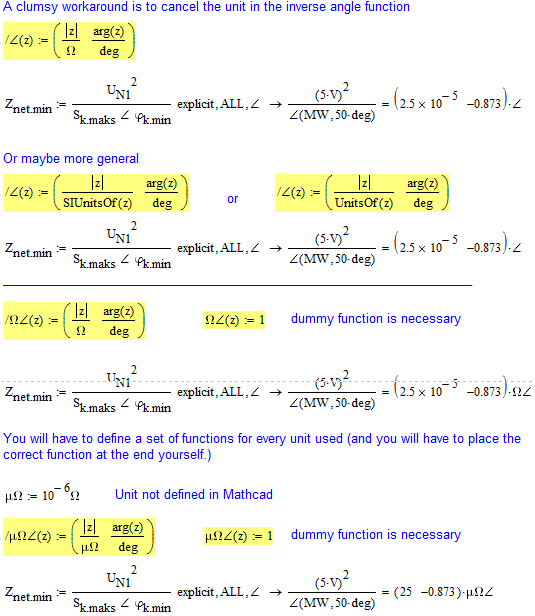
RecPol_mc15.png

3 replies

25-Diamond I
November 30, 2013

HumptyDummy.png

1-Visitor
November 30, 2013

Ah it is because it tries to explicit the angle symbol also. Doh. Thanks!

Okay, do you know if it is possible to create a keyboard shortcut to hide keywords?

25-Diamond I
November 30, 2013

Okay, do you know if it is possible to create a keyboard shortcut to hide keywords?

Maybe using a third party macro recorder?

1-Visitor
December 4, 2013

THANKS! It works

It does take alot of time though.

25-Diamond I
December 4, 2013

It does take alot of time though.

???

You know that you need to define those routines only once (preferably in a collapsed region at the top)?

1-Visitor
December 4, 2013

Yes, that is what I do. I can show you later when I finish the assignement.

When I make an explicit, mathcad remembers all the 0.097485983745089237598324759837 so when I define with explicit I have to make one more definition with the same name and result below, but now mathcad does not have all those decimals. So all the equations I do onwards will be nice and tidy

1-Visitor
December 4, 2013

Yes and I have also applied it to the symbolics. But if you use the value that you have just found, in another equation below, then it makes an error.

I guess I explained it wrong at first. Sorry.

Look at the yellow equations in the bottom.

25-Diamond I
December 4, 2013

I see the problem but unfortunately have no solution.

1-Visitor
December 4, 2013

Okay,

Thanks