
1-Visitor
June 24, 2013
Solved

How to compare vector values to a single number?

  • June 24, 2013
  • 4 replies
  • 3093 views

In the attached MathCAD 14 worksheet, I am attempting to compare the individual values in a vector to a single number and create a yes or know output. For a reason I have yet to understand, I am unable to compare these. Is there a particular way to compare these which I am missing?
Best answer by Werner_E

Daniel Sochor wrote:

In your attachment this works, however, in page 8 of the attached worksheet this E functionality does not work and I am unable to compare E to a single vector value. Is there a reason for this?

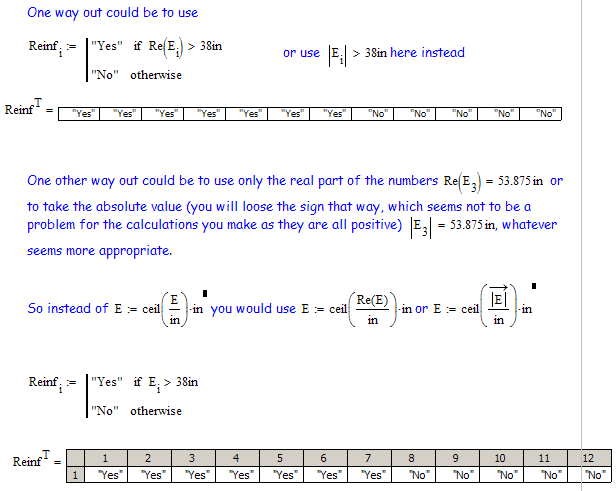
The reason for that is, that your vector E contains complex values which of course can not be ordered linear.

In your sheet the complex tolerance for numeric evaluations is set to 0 (default is 10), but this effects only the visual representation, not the value itself.

Way out is using only the real part of the values or their absolute value (if you are sute that you will never have to deal with negative values).

compare1.png

4 replies

24-Ruby IV
June 24, 2013

Sorry, not Origin but ORIGIN and not E[i:= but E := - see the attach please.

Or so

E.png

dsochor1-VisitorAuthor
1-Visitor
June 24, 2013

In your attachment this works, however, in page 8 of the attached worksheet this E functionality does not work and I am unable to compare E to a single vector value. Is there a reason for this?

24-Ruby IV
June 25, 2013