

4-Participant
March 21, 2017
Solved

How to draw 3D plot for my mathcad program

  • March 21, 2017
  • 2 replies
  • 4058 views

Dear all,

I want to draw 3D plot for my mathcad program by considering,

x-axis --->  x

y-axis ---> f(x)

z-axis ---> v

I attached my code below.

Best answer by Werner_E

Maybe you are looking for something like this:
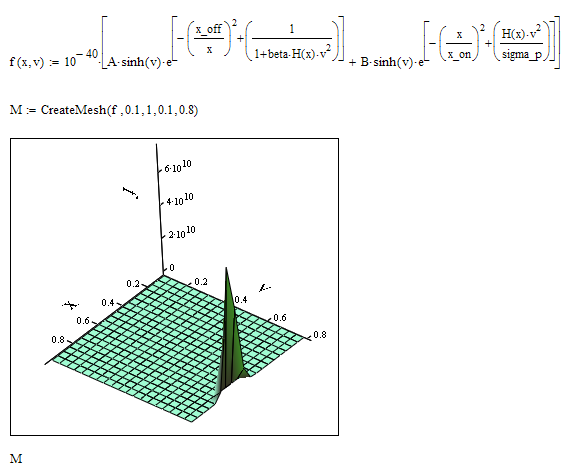
I have scaled the function by 10^-40 because Mathcad refused to turn the ploz and watch it at different angles without.

f(x,v() is shown in z-direction.

2 replies

21-Topaz II
March 21, 2017

Hi vetri veeran,

to do what you want, we need a function of x and y, ie, v (x, y) = v(x, f (x)), which, unfortunately it is unknown to us.

curva 3D.jpg

Werner_E25-Diamond IAnswer
25-Diamond I
March 21, 2017

Maybe you are looking for something like this:

I have scaled the function by 10^-40 because Mathcad refused to turn the ploz and watch it at different angles without.

f(x,v() is shown in z-direction.

vveeran4-ParticipantAuthor
4-Participant
March 21, 2017

Dear Werner Exinger and F.M,


Thank you for your reply.


I need to ask 2 questions to @Werner Exinger,


1. In your mathcad 3D plot, in the function M, 


Is y-axis (f(x)) is in log scale similar as in  2D plot (y-axis).


2. In the 2D plot, y-axis i.e., f(x) ranges from 10^-6 to 10^23, But in the 3D plot


it contains values from 0 to 6*10^10. Is it possible to make the same axis


as in y-axis in 2D plot. If not, could you please explain me what is the difference in 3D plot


after scaling when compared with 2D plot ?


25-Diamond I
March 21, 2017

Unfortunately you can't log scale an axis in a 3D-plot.

All you could do is to modify your equation.

So the drawback is that you don't see the real f values. 200 means 10^200 as log in mathcad is the base-10-log lg.

I have also shown the one curve you had drawn in your 2D-plot for comparison

In the 3D-plot we have much higher values because f gets rather quick huge when we increase v.

You can set axis limits in the plot format menu