
12-Amethyst
February 20, 2013
Solved

How to extract a symbolic only function to the numeric processor

  • February 20, 2013
  • 20 replies
  • 18019 views

Some functions are only recognized by the symbolic processor. I am looking for a way to encapsulate some of these functions so they are available to the numeric processor via a normal function call. An example with one such function - Si(x) - is shown in the attachments, with various schemes I have tried. The element-by-element approach in item 2 works for assigning values to an array of arguments, but is a bit more awkward than I prefer. My attempts at defining a function in items 4-6 haven't worked.

Is there a way to define a function that is recognized by the numeric processor that does effectively what is in item 4, but works? If it can be done for a scalar, then I would assume that vectorizing this function would allow evaluation with array arguments, since the symbolic encapsulation is isolated in the scalar function definition.

If responding with a file, please save in mcd11 format.

Thanks,

Lou
Best answer by Werner_E

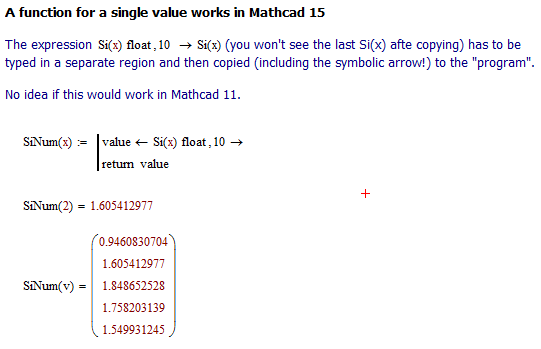
As you can see in the attached pdf the behaviour of your sheet is differently in Mathcad15 - we get an error in item 2.

Nevertheless I seem to have found a way to turn Si into a numeric function which at least works in Mathcad15, hopefully in Mathcad 11, too.

I have just played around with it and you can even make the precision (now fixed to 10) a second parameter of the function SiNum.

symbolic escape_2.png

20 replies

Werner_E
Werner_E25-Diamond IAnswer
25-Diamond I
February 20, 2013

As you can see in the attached pdf the behaviour of your sheet is differently in Mathcad15 - we get an error in item 2.

Nevertheless I seem to have found a way to turn Si into a numeric function which at least works in Mathcad15, hopefully in Mathcad 11, too.

I have just played around with it and you can even make the precision (now fixed to 10) a second parameter of the function SiNum.

symbolic escape_2.png

LouP12-AmethystAuthor
12-Amethyst
February 20, 2013

Werner - the paste of the full symbolic line into the program works as you suggested in mcd11. It then implements a scalar function. In mcd11, the vectorize is not implicit, as you show for Shi(v), but this is easy to resolve by modifying the program or just explicitly using vectorize.

While I have used symbolic manipulation and functions a fair amount, I have not created programs including them; they've been somewhat of a mystery to get working (as my attempts show). The help documentation wasn't helpful, as I expected, but I read through it anyway. Your hint about copying/pasting the full underlying symbolic line was key, and I expect to get my more complicated real work moving now that you pointed me in the right direction.

Thanks,

Lou

Werner_E
25-Diamond I
February 20, 2013

Glad that it worked for you in Mathcad 11, too.

The copy and past thing is a real tricky one. I've learned it here (where else) when I was trying to write a program to solve a first order DE symbolically and no matter what the variable is named (should be a parameter of my function). While beeing quite tricky I succeeded but never tackled to expand to second order DEs since then.

You may even simplify SiNum by omitting the return line, BTW, making it a one-liner.

Its especially hard to see that the symbolic evaluation only affects the invokement of the Si-function an not the whole program/local assignment as you would get without copying.

symbolic+escape_3.png