
1-Visitor
December 28, 2010
Solved

how to import data from large MS Office 2007 Excel sheets

  • December 28, 2010
  • 14 replies
  • 8571 views

trying to import numerical data from Excel sheet created (or saved ) with MS Office 2007, to Mathcad 15 worksheet:

data: 36,000 by 100 matrix containing integers

imported from MS Office 2003 Excel file (*.xls - physical size 66,799 KB) - no problem

imported from 2007 Excel file (*.xlsx - physical size 20,272 KB) - termination on error after about 60 secs, no error message given

On saving this file, 2003 Excel warns that data may have been lost (none are), while 2007 Excel has no warning for a physically much smaller file but cannot be read from Mathcad 15 worksheet.

Somewhere I have read that the problem is familiar from Mathcad 14
Best answer by MikeArmstrong
it is mandatory for my purposes that the data be physically present & unchanged in an application that is re-run many times in many repeated sessions, but aren't we a bit getting into a discussion of whether the problem could be avoided rather thasn solved?

Sometimes problems cannot be directly solved the way we wish and therefore a workaround is derived.

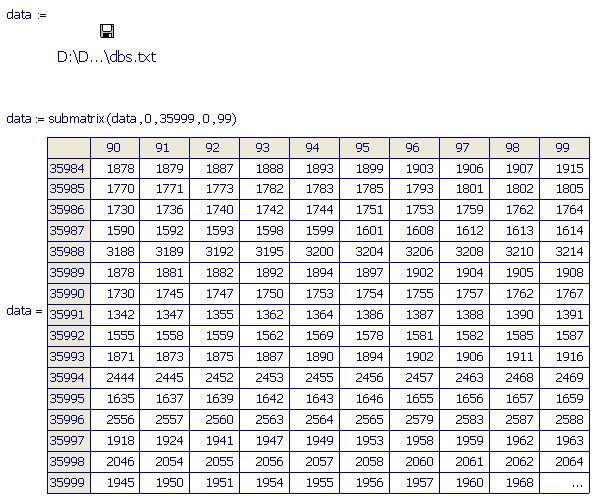
The Excel sheet you posted basically crashed my computer when I tried to read it into Mathcad. I converted the data to a *.txt file and got an error message stating "Out of memory".

If I use the Submatrix I can read in the data though.

Example.jpg

Mike

14 replies

1-Visitor
December 28, 2010

Can you post the Excel file you are trying to read into Mathcad?

Mike

foxbat1-VisitorAuthor
1-Visitor
December 28, 2010

I'll attach the shorter *.xlsx one (the one Mathcad can't read) - the other one's too big for this platform

1-Visitor
December 28, 2010

Wow, that is a large file.

Can you confirm how the data is generated and then saved in Excel format? Is it saved in that format from another piece of software?

Mike