
14-Alexandrite
October 23, 2013
Solved

How to lookup a value in an array

  • October 23, 2013
  • 13 replies
  • 8275 views

Hello,

i am attaching a mathcad14 sheet. it is not a live sheet becuase i got this shot from a big mathcadsheet. i would like to be able to look up the value that is in column "0" that corresponds to max(I_1,I_2) which are in columns 1 &2, and also do the same thing but seperately for max(I_3,I_4) which are in columns 3 &4. i am expecting the answer for the first one to be 48.707(column 0), and for the second one 48.707(column0). This time it happens to be the same value from column 0, but normaly thaey are different. In case they are more than one value in column 0, that corresponds to single value for max(I_1,I_2), make it to list all values off column 0. similarly for max(I_3,I_4). Thanks for your assistance!!
Best answer by Werner_E

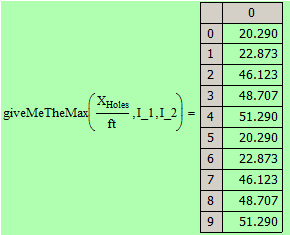
The reason for this effect is because Mathcads various lookup and match routines use the system variable TOL to decide if a value is found. This means it might not be an exact match (thats another difference between Andy's Match and the builtin match).

In your sheet TOL is set to 10^-2 (which is rather low but I guess there might be a reason for this). With this setting lookup will find 10 values in L_1 and L_2 which are around the searched for max within this tolerance and returns the corresponding values in X.Holes. In fact there are only 5 values, but each one is found twice as the columns L_1 and L_2 are identical.

24.10.png

As you had decided you are interested in the first one only, you get it and it is 20.290.

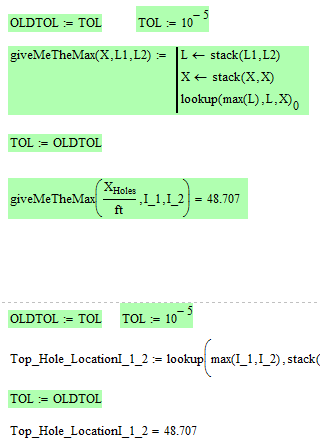
Setting TOL to the default 10^-3 or lower cures the problem and only two matches are found (which is OK as we have the max value in the first and in the second column present (and fortunately in the same row.

So one way to get what you want is to set TOL lower before using lookup and back to the desired value afterwards

24.10.png

or use Andys routine (maybe modified so it return the desired value directly) or use the more versatile routine which I provided at the end of the sheet I posted.

13 replies

24-Ruby IV
October 23, 2013

It is a question for Werner!

12-Amethyst
October 23, 2013

Easier to test the functions if you supply test data, but I think that this shouold work

Regards

Andy

SFares14-AlexandriteAuthor
14-Alexandrite
October 23, 2013

it is a 10M sheet. i was trying "vlookup" , but it did not work. most likely i am not using it correctly. you can send me how you would look up the value using Mathcad function, and i will try it. Thanks!

Werner_E
25-Diamond I
October 23, 2013

So burn it down to a managable size.

Create a sample worksheet with small vectors and matrices, maybe created by random to demonstrate what you want. This would give us something concrete to work with. You will have to specify what should happen if the max of I_1 & I_2 happens to appear more than once. Lets say the max is 0.943 but it appears in row 14 AND row 16 of I_2 AND in row 17 of I_2. What result do you expect? An error message, the first occurence (row 14 --> 38.373, all3 values in a vector?

While I would prefer a small self written routine one idea is to stack L_1 and L_2 one on top of each other, stack X.Holes on top of itself and use vlookup, match.