
1-Visitor
December 14, 2012
Solved

How to preserve a constant when doing symbolic solve?

  • December 14, 2012
  • 3 replies
  • 2449 views

Dear friends,

Is there any possibility to tell Mathcad Prime 2.0 to display constants with their symbols (in contrast to evaluating them) when performing a symbolic solve of a function?

P.S. The constants are defined by the user.
Best answer by tdevaraj

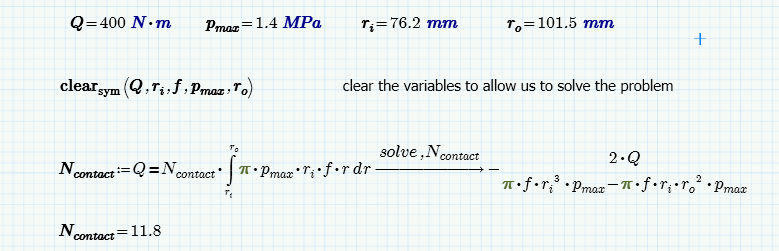
Mathcad Prime 2.0, has a clear( ) function to clear variables for re-use further down the sheet.

Also the clear.sym( ) function allows you clear said variables for use in symbolic applications whilst retaining numeric values.

see example below.

clear+symbolics.png

3 replies

tdevaraj1-VisitorAnswer
1-Visitor
December 14, 2012

Mathcad Prime 2.0, has a clear( ) function to clear variables for re-use further down the sheet.

Also the clear.sym( ) function allows you clear said variables for use in symbolic applications whilst retaining numeric values.

see example below.

clear+symbolics.png

JohnDoe1-VisitorAuthor
1-Visitor
December 14, 2012

Thank you.

Why the formula is becoming grey after using clear()? (see my attached example).

I used clear_sym() also in other projects an most subsequent equations turned grey. Is this normal?

What is the opposite to clear_sym()? (to make evaluating of variable possible again in symbolic solve).

1-Visitor
December 14, 2012

What is the opposite to clear_sym()? (to make evaluating of variable possible again in symbolic solve).

Answer: There is no opposite...see explanation in screen shot

clear_symbolics_example.png