
1-Visitor
November 8, 2012
Solved

How to read Metadata-custom-properties and write them in a textbox?

  • November 8, 2012
  • 2 replies
  • 2816 views

Hej,

little question, please.... i can´t find my question in the MC-help....

With the script of a textbox like this:

Sub TextBoxEvent_Exec(Inputs,Outputs)

TextBox.Text = Worksheet.Metadata.Revision

textbox.appearance=0

i can read the regular Metadata out of the FilePropertyWindow.

But what is the right expression for reading the entries in "CustomProperties" ?tt.jpg
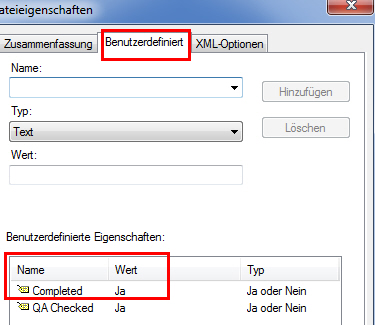
Thanks for help.

Best answer by SeeBear

Hej,

Thanks StuartBruff....

in my case:

textbox.text = worksheet.metadata.customitems.item(2) ' Darstellung 3. Eintrag in der "Benutzerdefinierten Dateieigenschaft"

additional help:

http://www.ptc.com/WCMS/files/129628/en/Mathcad_-_custom-controls13.pdf

2 replies

23-Emerald V
November 8, 2012

R. Lampert wrote:

Hej,

little question, please.... i can´t find my question in the MC-help....

With the script of a textbox like this:

Sub TextBoxEvent_Exec(Inputs,Outputs)

TextBox.Text = Worksheet.Metadata.Revision

textbox.appearance=0

i can read the regular Metadata out of the FilePropertyWindow.

But what is the right expression for reading the entries in "CustomProperties" ?

Thanks for help.


TextBox.Text = worksheet.metadata.customitems.count

Outputs(0).Value = TextBox.Text

SeeBear1-VisitorAuthorAnswer
1-Visitor
November 8, 2012

Hej,

Thanks StuartBruff....

in my case:

textbox.text = worksheet.metadata.customitems.item(2) ' Darstellung 3. Eintrag in der "Benutzerdefinierten Dateieigenschaft"

additional help:

http://www.ptc.com/WCMS/files/129628/en/Mathcad_-_custom-controls13.pdf