
1-Visitor
January 30, 2014
Solved

How to rotate matrix around specific index?

  • January 30, 2014
  • 5 replies
  • 16671 views

Dear community,

I want to rotate matrix around specific index in Mathcad15. Of course, in that case, the index becomes a center of rotation. I'm aware of the function rotate(M, angle) but the result is not the one i wanted. How can I achieve this?

Thanks,

Goran
Best answer by Werner_E

Look if the attached would help.

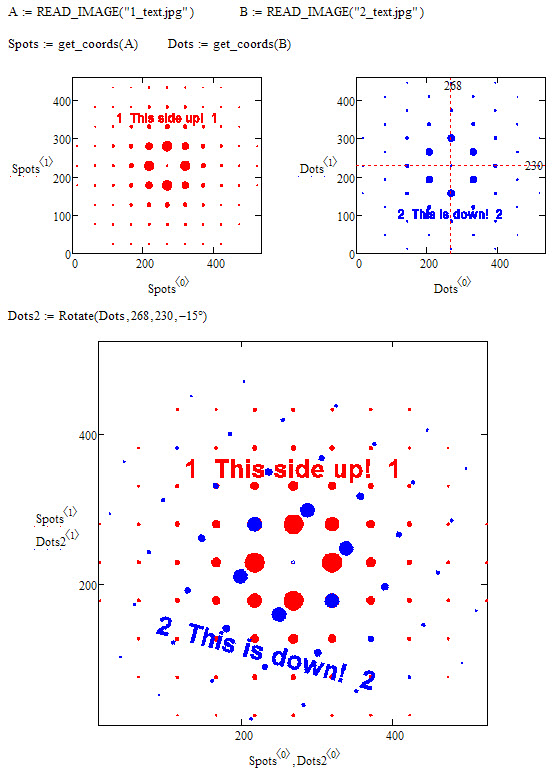
The utility routine "Rotate()" works not on the image matrix but on the data structure you created and allows for an arbitrary center of rotation. I modified the routine for creation of the coordinate vectors so that the picture is showed correct in the xy-plot.

30.01.jpg

5 replies

25-Diamond I
January 30, 2014

I'm aware of the function rotate(M, angle) but the result is not the one i wanted.

So what is the result you want? Post an example of what you are searcing for.

naz_or1-VisitorAuthor
1-Visitor
January 30, 2014

Dear Werner,

Here are the files. The wanted result is an image obtained by overlapping of two images where one of them is rotated for 15 degree.

Thanks!

12-Amethyst
January 30, 2014

Hi,,

Rotate should act on the original image data

the size of the data returned is increased & you need to take a subset of it to re-center the image data.

Using your spot & dot functions now gives something closer to your stated goal.

The downside at the moment is that rotate is adding a black border that confuses the situation.

One option would be to transpose the original image onto a larger (blank) image before rotating so that the final cropped / rotated image doesn't have the black corners.

regards

Andy

1-Visitor
January 30, 2014

Typical matrix rotations occur about the origin. To rotate about some other location, translate from that location to the origin, perform the rotation, and then translate back.

12-Amethyst
January 30, 2014

Unfortunately MathCad's ORIGIN is quite limited, All vectors & matrices start at origin & then all rows/ columns are positive offsets from this.

Doesn't allow for -ve bounds or differences between offsets in x & y plane.

Here's a version that almost works,

Regards

Andy

25-Diamond I
January 30, 2014

Here's a version that almost works,

To get rid of the black background (or better: to make it white) you get after rotation, wouldn't it be easier to invert the image, rotate it and then again invert the result?.

The difficulty with doing the rotation with the image rather than with the coordinates is the center of rotation. The method here only works for a rotation around the center of the image, which seems to be what Goran is after anyway.

24-Ruby IV
January 30, 2014

IR.png

See please the Mathcad 15 sheet with the function rotate in attach.

Werner_E25-Diamond IAnswer
25-Diamond I
January 30, 2014

Look if the attached would help.

The utility routine "Rotate()" works not on the image matrix but on the data structure you created and allows for an arbitrary center of rotation. I modified the routine for creation of the coordinate vectors so that the picture is showed correct in the xy-plot.

30.01.jpg

12-Amethyst
February 4, 2014

Werner,

The Spot&Dots.avi would be perfect as a Video upload.

25-Diamond I
February 4, 2014

DanMarotta wrote:

Werner,

The Spot&Dots.avi would be perfect as a Video upload.

It belongs to this post, so I consider its better accessible as an attachment here rather than providing a link to the video section.

Furthermore those flash videos have a lot of disadvantages. The quality usually is not that good and sometimes I have problems to get them to run at all. People can't store and file the videos locally for offline usage and to keep them together with the associated documents. And especially with videos we create with Mathcad its very often useful and necesary to look at them frame by frame, back and forth - this can easily be done locally with a standard avi but not with the flash video player provided.

Personally I don't see much sense in separating after medi type - her is the text, here is the picture section and over here we have videos. If it belongs together, keep it together.

Video section may be useful for longer explanation/turorial videos just because of the smaller file size of the flash videos, but it doesnt make sense to keep them separate from text and pics. Openeing a tutorial section for a specific software (no matter if just text, word doc, pdf or video tutorial) may make sense. Its the content which matters, not the medium.

If I am searching help, it won't matter if the solution to my problem is provided by text, pix or video (OK, personally I'd prefer text) , but I sure would like to be able to download it for me to keep for reference.

And at last - I know, I would get much more points (whaterver they are for) for uploading a simple video than I'd get for providing the correct answer to a problem, which is ridiculous anyway. But as long as I am not able to turn in those points for something useful, I won't care 😉

naz_or1-VisitorAuthor
1-Visitor
January 31, 2014

Thanks guys,

I really appreciate your help. The solutions proposed by A. Westerman and W. Exinger are both useful. I have to notice that the one provided by Mr. Exinger is more elegant, although both have solved my problem. I would say that solution of Mr. Westerman is more general since it enables manupulation with origin and finding of image center, which is important when the images are not of the same size. On the other hand, when a set of images has the same size, like in my case, the solution by Mr. Exinger is more adequate.

P.S. Can you recomend me some literature about programming in Mathcad?

G