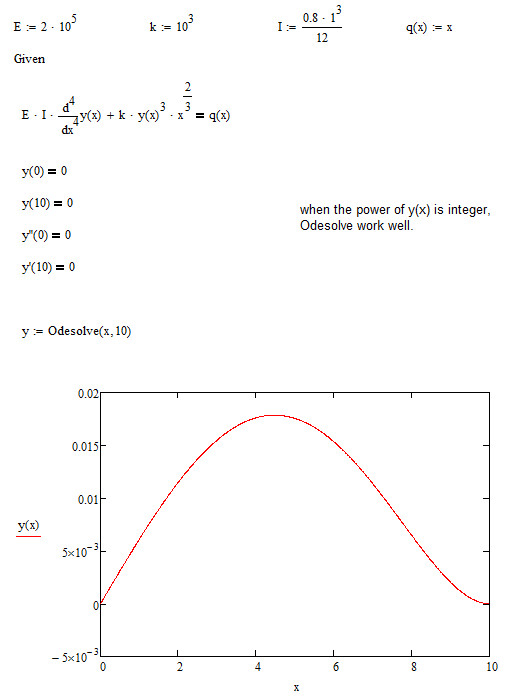
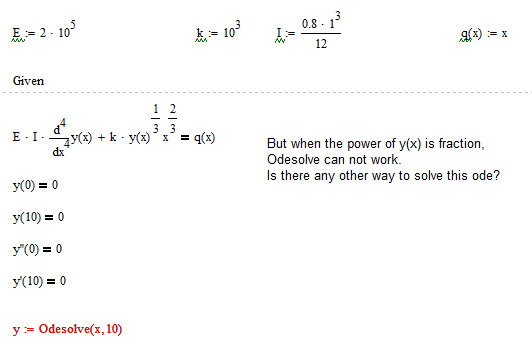
Best answer by Werner_E

zhu laojianke wrote:

I use the nth_root(), but the graph what I have got is not like you've pasted there...

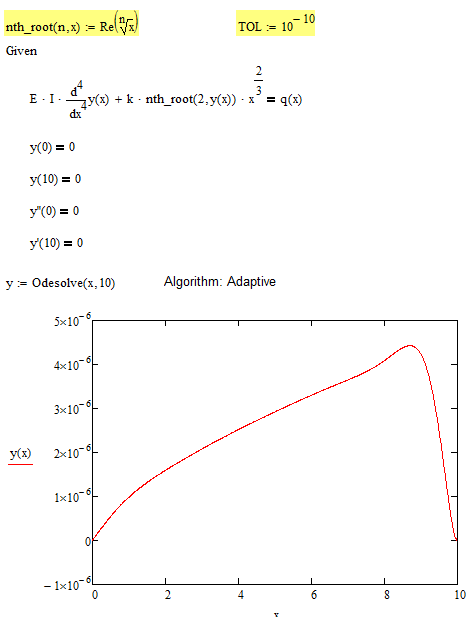
This is possibly because you used a different numeric algorithm. Right click on the word odesolve and look what you have chosen. Usually "Adams/BDF" or Adaptive are a good choice. I guess you have chosen "Fixed".

BTW, here is another way to force real values for any root. It depends on the underlying problem if any of these workarounds make sense!

You can also try to increase accuracy by setting TOL to a value lower than the default 10^-3.
1.png

9 replies

Werner_E
25-Diamond I
August 10, 2014

The problem is the definition of a^(1/3) of being the complex solution of the equation x=a^3 which has the smallest argument.

While 8^(1/3) is 2 (agrument = 0) we do NOT get (-8)^(1/3)=-2 (argument = pi) but a complex value with magnitude 2 and argument pi/3.

So whenever y(x) gets neagtive your calculations returns a non-real value and odesolve fails.

Resist from writing |y(x)|^(1/3) as this will work (its even faster), but give you a wrong result (see attachment).

Fortunately there is a compromise built into Mathcad. The root symbol defaults to the real value and that solves your problem (calculation time is significantly higher - not sure why).

1.png

1-Visitor
August 10, 2014

Thank you werner, your method really work well.

But when I change the power from 1/3 to 1/2, even use sqrt(), it still won't work...

2014-08-10_223802.jpg

It seems when the root number of y(x) is even, the solve block will say "This value must be a real number".

Werner_E
25-Diamond I
August 10, 2014

The square root of a negative y(x) is of course non-real - regardless of how you write it.