1-Visitor
May 29, 2017
Solved

How to tell Mathcad that what we write is a unit?

  • May 29, 2017
  • 9 replies
  • 14243 views

1. I meant to write nC/m^3 as a unit, nanoCoulomb per meter cubic.

However mathcad considers it as something else (variable maybe?)
All the calculations are correct.

What should I do?

2. I should put unit meter m on variable r2.

But if I do that, the calculation goes wrong.

any idea?

Screenshot (2).png

Best answer by LucMeekes

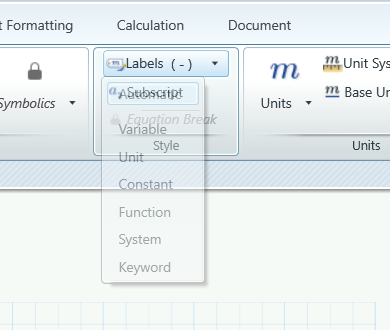
Select the item ( the nC ) and set its label to 'Unit' using the appropriate  item on the ribbon:

Then do the same for the 'm' of metre.

Success!

Luc

P.S. While you're at it, change the style for the Unit display from italic to upright (roman) to comply with international standard...

9 replies

LucMeekes23-Emerald IVAnswer
23-Emerald IV
May 30, 2017

Select the item ( the nC ) and set its label to 'Unit' using the appropriate  item on the ribbon:

Then do the same for the 'm' of metre.

Success!

Luc

P.S. While you're at it, change the style for the Unit display from italic to upright (roman) to comply with international standard...

bmulyanto1-VisitorAuthor
1-Visitor
May 30, 2017

aaah...it is there.
Thank you.

I tried to do right click but it is not there.

Sorry, I am usually better than this.

23-Emerald IV
May 30, 2017

It's a funny thing that is happening in your sheet.

Your definition of rho, where nC and m are not recognized as units (that is, they're not labelled as such), defines rho as a constant times a construct of two variables (nC and m). I wonder why they're not flagged (red) as Unknowns.... do you have them defined outside of the picture?

Then you define Q using a symbolic operation, this shows nC and m in the answer as is to be expected, knowing that the symbolic processor does not know about units.

Requesting the value of Q gives its value, where all of a sudden nC and m are labelled as units.  !

bmulyanto1-VisitorAuthor
1-Visitor
May 30, 2017

. I wonder why they're not flagged (red) as Unknowns.... do you have them defined outside of the picture?

No, I do not.

23-Emerald IV
May 30, 2017

Ah,

I guess part of the mystery lies with the fact that you have a problem in your sheet.

The definition of rho contains a variable that is undefined. Is that an r? Do you mean rho to be a function of r? then you should define it as rho(r):=...

And use it as such in within the integral in the definition of Q.

Success!
Luc

bmulyanto1-VisitorAuthor
1-Visitor
May 30, 2017

done defining rho as rho(r).
still have issue.

23-Emerald I
May 30, 2017

Okay, you have more problems than you think.

The red circle around the r in the equation for rhoV means that Mathcad doesn't know what to do with it.  So when you try to evaluate rhoV you get:

Then you evaluate the integral but using the symbolic processor.  If you ask for a numeric answer you get:

I've converted rhoV to a function, and added units to r1 and r2; might have gotten the units on rhoV wrong.  See if this helps.

:

bmulyanto1-VisitorAuthor
1-Visitor
May 30, 2017

yes, I know I got some warnings there (red box).
I had not minded them because I thought as long as I got the result as I expected, I considered it ok.

However, I agree that it is good to write it properly and I am trying to now.
Thanks.

23-Emerald IV
May 30, 2017

Does this help?

bmulyanto1-VisitorAuthor
1-Visitor
May 30, 2017

That is quite a trick to work around with the function we are working on.
I use mathcad to check my hand calculation and to document it for reference, so I prefer to keep the original function as it is.
Thanks anyway.

21-Topaz II
May 30, 2017

Hi budi mulyanto,

you could insert in your worksheet by mean of the istruction "include" the following worksheet that you find attached:

multiples and submultiples.jpg

bmulyanto1-VisitorAuthor
1-Visitor
May 30, 2017

Thanks!
I will take a look and tried it.

bmulyanto1-VisitorAuthor
1-Visitor
May 30, 2017

Thank you all for your help.

I got the correct result now.

what I learned so far:

1. exponent value must be dimensionless.

2. mind the function's dependencies. --> this leads me to another question. maybe I will make a new thread.


Screenshot (4).png

25-Diamond I
May 30, 2017

I guess its a better view not to say that we must make r dimensionless in the definition of rho but rather accept that the factor 1000 in the exponent must have dimension lenght^-1.

bmulyanto1-VisitorAuthor
1-Visitor
May 30, 2017

Hi again..
I have similar problem but it is related to a matrix now.

The output matrix become unitless.
All calculations are correct.

Screenshot (6).png

25-Diamond I
May 30, 2017

Its the symbolic engine which does not know anything about units.

If you evaluate your functions numerically (with specific value for x and y) you will see the units labeled as they should be.

On the "Calculations Ribbon in "Worksheet Settings" -> "Calculations Options" you can switch on "Units/Constants in Symbolics" but as far as i can tell is has not much effect. Not sure what this option is for.

BTW, shouldn't it be

or do you really want x to be dimensionless?

25-Diamond I
May 30, 2017

Correction. The aforementioned option shows effect after recalculation.

The reason you see |m| is because the symbolics still don't understand units and treats m as an unknown variable which could as well be negative or non-real.

If thats a problem you may add "assume, m>0" to the symbolic eval.

1-Visitor
May 31, 2017

I think you need to define the unit, as mathcad doesn't recognize it. For example, I wanted to use feet of water as a pressure, so I defined it in terms matchad recognized;

Capture.JPG

then I was able to use it:

Capture2.JPG

25-Diamond I
May 31, 2017

From what I see you did not define H2Oft as unit. So its just a variable you multiply you quantities with.

If you label H2Oft as unit it gets treated colored as all other units for better consistency

1-Visitor
May 31, 2017

You are exactly right! Thank-you.