Best answer by ttokoro

image.pngimage.png

3 replies

ttokoro
ttokoro21-Topaz IAnswer
21-Topaz I
August 2, 2023

image.pngimage.png

t.t.
Cornel19-TanzaniteAuthor
19-Tanzanite
August 2, 2023
23-Emerald IV
August 2, 2023

In this case, you accept it, because you do redefine the vector d purposely.

It's just a warning, not an error.


Success!
Luc

23-Emerald IV
August 2, 2023

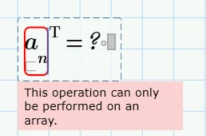
You do that with the transpose operator, like you did.

But you have to do it on the vector, not on a range.

the vector is a, not an.

So remove that [n from a under the transpose and it works.


Explanation:

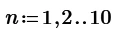
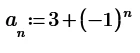
You created the vector a in a neat, regular, legal way, using the range n.

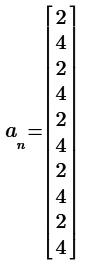
To show the vector a, all you need to do is type

a=

and it will show the column vector.

You typed

an=

which appears to show the same, but Prime interprets as something else. It takes the vector a, and apples the range n, and displays for each of the values of the range n, the corresponding element of a. And the displayed result looks just the same as when it shows the vector a.


Success!
Luc


25-Diamond I
August 2, 2023

According row vector:

Werner_E_0-1690970801207.png


According the green redefinition warning:

It appears because you are changing the value of "d". As this is exactly what you intend, you may ignore that warning.

You may also consider turning off these warnings

Werner_E_1-1690971001047.png


Cornel19-TanzaniteAuthor
19-Tanzanite
August 2, 2023

Cornel_0-1690974504878.png

Cornel_1-1690974511405.png


Case 1:

Cornel_2-1690974565364.png

Cornel_3-1690974584032.png


Case 2:

Cornel_4-1690974601677.png

Cornel_5-1690974622297.png

According to calculation:

Cornel_7-1690974837931.png

So, I need to put ORIGIN=1 in order for first element to be equal with 2, with the real a1 value, even that I defined n = 1, 2...10, so the first element of n is 1. Why is this difference?


EDIT:

Cornel_1-1690975539808.png

Cornel_0-1690975530154.png

Cornel_2-1690975546802.png

Cornel_3-1690975558200.png

25-Diamond I
August 2, 2023

An ORIGIN-independent approach to create a vector with the first 10 values:

Werner_E_1-1690977911775.png


or a different approach using a vector n:

Werner_E_3-1690978281830.png

Using explicit vectorization is not mandatory in this case, but might be in case of different calculations.


Of course you can also turn the range into a vector using that undocumented trick with the inline evaluation:

Werner_E_0-1690979859981.png