1-Visitor
April 2, 2012
Solved

How to use mathcad to symbolically extract variables

  • April 2, 2012
  • 2 replies
  • 11007 views

How can I use the symbolic processor to extract the matrix so my equations will take the form
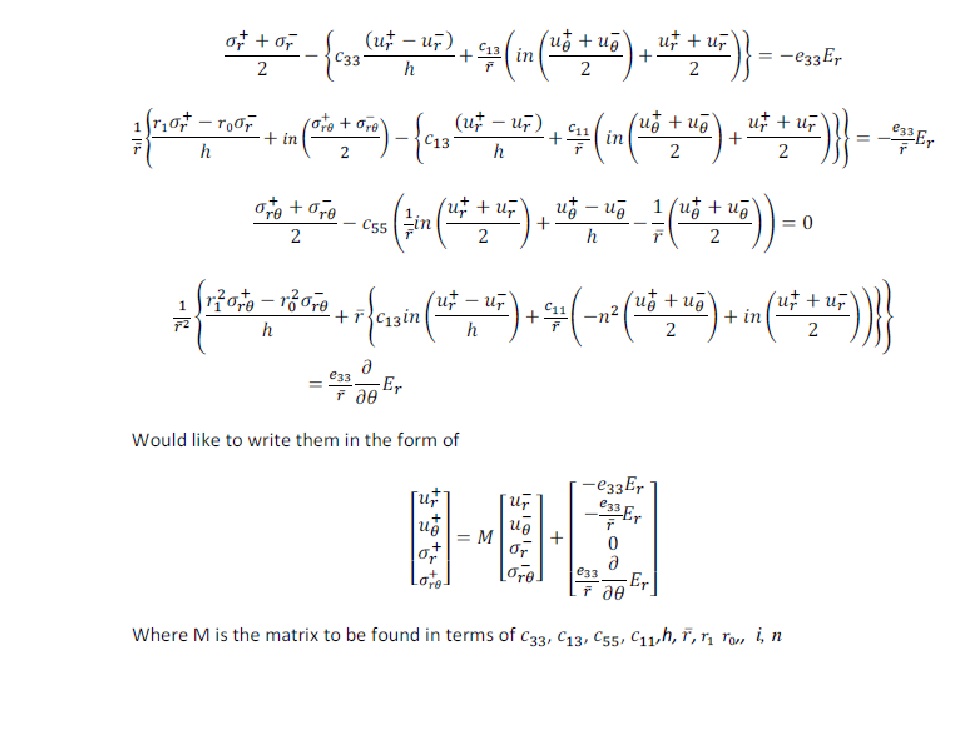
My transfer matrix.jpg

Best answer by LucMeekes

Hi Chad,

Here's my approach to the solution of your problem. Hope it helps.

Note that I'm using Mathcad version 11.

In contrast to Wayne's remark, they do seem to be linear...

Success!

Luc

2 replies

12-Amethyst
April 2, 2012

This might help get you started (I hope, cause I don't know how to finish, since they are not linear and independent)

19-Tanzanite
April 2, 2012

The Find also works if you put a "Given" at the top of the worksheet to start the solve block. The result is too large to display, but it does find an answer.

Of course, your version is a whole lot more elegant though!

LucMeekes23-Emerald IVAnswer
23-Emerald IV
April 2, 2012

Hi Chad,

Here's my approach to the solution of your problem. Hope it helps.

Note that I'm using Mathcad version 11.

In contrast to Wayne's remark, they do seem to be linear...

Success!

Luc

ChadG.1-VisitorAuthor
1-Visitor
April 2, 2012

Hi Luc,

Thank you so much

(I do not know why the sheet won't provide symbolic answers to me Maybe because of version difference)

23-Emerald IV
April 3, 2012

Hi Chad,

What version of Mathcad are you using?

Ah, I see you started another thread about that. You're using 14.

14 uses a different symbolic machine (MuPad) from the one used in pre-14 versions (Maple). This is known to cause (sometimes huge) differences.

As you can see I've used some weird formula manipulations to actually extract the coefficients. This is because the 'coeff' symbolic instruction failed to provide me what I wanted. Maybe if you rebuild the sheet in 14, with the intention of the method, you can make it to work, provided 14 is kind enough to give asymbolic answer for Sol0..

Oh yea, another quirk is the fact that mathcad sometimes fails to give a symbolic answer because the expression is "too big". Instead it suggests to use submatrix...

There is a solution for that. It requires (adding or) increasing a value in a Mathcad section of Windows's register. I have that value set to a large number, so I will get a symbolic answer in most cases, rather than the submatrix suggestion. Refer to http://communities.ptc.com/message/43300#43300.

Success!

Luc
