
1-Visitor
March 28, 2011
Solved

How to use solve block results

  • March 28, 2011
  • 1 reply
  • 2832 views

Hi!

How can I use the values from a solve block further down my calculations ? They are all nicely calculated in the solve block but they are unusable because they don't have a letter or any kind of notation attached to the values.
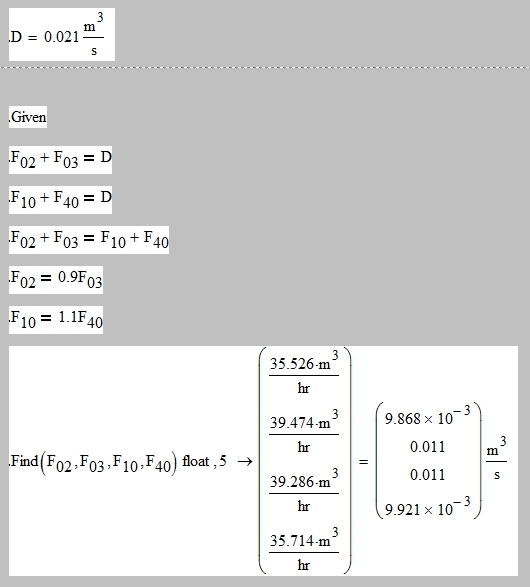
ScreenShot001.jpg

Tried to use definition := sign in this last block and build a matrix of 4x1 putting all F's on the column in the right order but when I try to see the value of any F (via = sign) after telling mathcad what values they should have, program crashes (Mathcad15)...
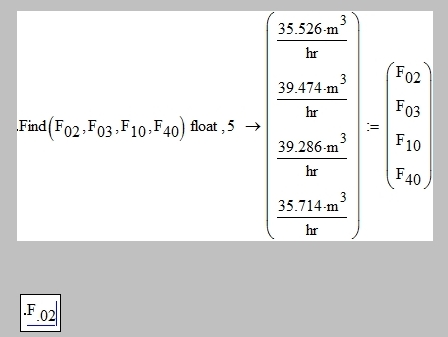
ScreenShot002.jpg Total Freeze after "evaluate numericaly" icon push (=)

Best answer by StuartBruff

Johnny,

Use the definition operator the other way round, ie v:=Find(...)

This should give you a vector, v, containing the results of the solve block.

Stuart

1 reply

23-Emerald V
March 28, 2011

Johnny,

Use the definition operator the other way round, ie v:=Find(...)

This should give you a vector, v, containing the results of the solve block.

Stuart

Johnny1-VisitorAuthor
1-Visitor
March 28, 2011

Wow it was just the order. Thanks a mil, it works now !

23-Emerald I
March 28, 2011

You might also want to consider using a numerical solve block rather than a symbolic solver. (The arrow asks for a symbolic solver, Typing Find() = asks for a numeric solver instead.) Since Mathcad is a numereic (primarily) engine, the numeric solver may be more robust. Since you got an answer that you're happy with using the method you did . . .

Whatever works!! 😉