12-Amethyst
March 14, 2022
Solved

If Statements Within Tables

  • March 14, 2022
  • 1 reply
  • 4615 views

Hi guys i have a tabulated problem of which I am trying to multiply out various terms


There is a column headed mp. as each term is multiplied out there becomes a point where this figure becomes a minus value. At this point i need the equation to change. I have tried an IF statement however because i am working within a table format it will not let me achieve this function. 


I was wondering has anyone come across this or should i remove the table element and do this long hand?


Sheet attached 


Thanks 🙂

Best answer by Werner_E

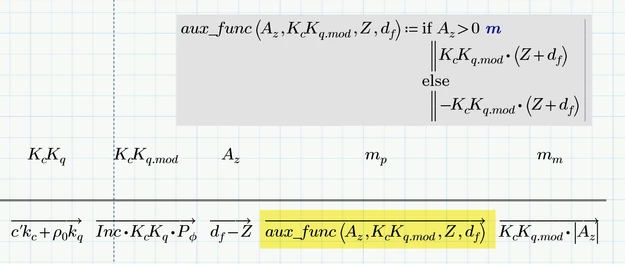
The main reason you are getting the error is because Prime does not allow to vectorize a comparison operator directly. A workaround is to define a function beforehand which does the comparison and call that function vectorized.

Werner_E_0-1647351255131.png


So the vector mp is now calculated as you expected it and could be used afterwards. But the use of a Prime table for doing so is not needed (and does not make much sense IMHO) anyway.

As Fred already wrote a Prime table can only be used to input data vectors manually but is in no way helpful if your goal is to display data.


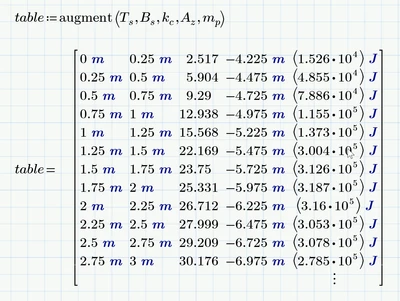
Prime does not offer a decent way to display data in a nice and clear way. You may create a table by augmenting the data vectors

Werner_E_1-1647351954339.png

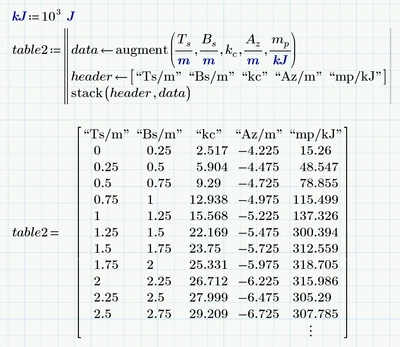
Or you can get rid of the units in the table and add an (ugly looking) header

Werner_E_2-1647352026709.png


1 reply

23-Emerald I
March 14, 2022

Two quick observations:

      1) Mathcad is not EXCEL.  Tables in Prime are only data entry vehicles.  If you copy a range of numbers from an EXCEL spreadsheet and simply paste them into Mathcad, (cntrl-P) you'll create a table--the numbers will appear with two blank place holders at the top of each column.  The top placeholder is for a variable name, the one below is for a unit if one is needed.  These are now vector variables in Mathcad.

     2) Unlike EXCEL you can't put formulas into a table.  They are for input only.


But, once you have the variables you can write functions to operate on them or simply define new variables from combinations.


One more observation:  there are two types of subscript--literal and index.  A literal subscript (ctrl-0) is part of the variable (All of your subscripts appear to be literal.)  An index subscript ([) points to one element of a vector variable.

Fred_Kohlhepp_0-1647280889620.png

Index subscripts must be integer numbers, but they can be computed numbers.


Proper use of Mathcad can make this much easier to understand.


12-Amethyst
March 15, 2022

Thanks Fred, understand where you are coming from.


The table idea would work if there wasn't an IF statement i.e. if i wanted the total value of mm I could use sum of get the answer. I was trying to find a way to present data and formulas in one place which would in excel be a traditional iterative process. 


To quote Luc there is no easy way to learn Mathcad, you learn it from using it. 


I was just trying to come up with something different 


Thank you for your input. 

Werner_E25-Diamond IAnswer
25-Diamond I
March 15, 2022

The main reason you are getting the error is because Prime does not allow to vectorize a comparison operator directly. A workaround is to define a function beforehand which does the comparison and call that function vectorized.

Werner_E_0-1647351255131.png


So the vector mp is now calculated as you expected it and could be used afterwards. But the use of a Prime table for doing so is not needed (and does not make much sense IMHO) anyway.

As Fred already wrote a Prime table can only be used to input data vectors manually but is in no way helpful if your goal is to display data.


Prime does not offer a decent way to display data in a nice and clear way. You may create a table by augmenting the data vectors

Werner_E_1-1647351954339.png

Or you can get rid of the units in the table and add an (ugly looking) header

Werner_E_2-1647352026709.png