10-Marble
November 1, 2025
Solved

inconsistencies related to custom units, MCPv11

  • November 1, 2025
  • 3 replies
  • 782 views

I am trying to use custom units in MCP v11. I have an included worksheet that includes a lot of domain-specific units and functions. This has been carried over from MCv15 and previous. I am now noticing that some of these definitions aren't working - I have distilled everything down to one simple example of success and failure, with no apparent reason why. See attached.

I also tried to do my due diligence and see if anyone was reporting anything similar. Why there are lots of questions related to use of units, I didn't see a similar issue being reported.

Best answer by Werner_E

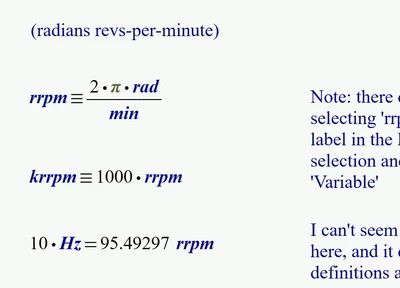
I had no problems to change the label of "rrpm" and "krrpm"from "Variable" to "Unit" via the menu.
Werner_E_0-1762024225828.png

But I remember that from time to time in the past I had a similar problem as the one you describe - changing the label via the menu did not work as the label would immediately snap back to "Variable" as soon as the focus was out of the region.

I don't know what caused that misbehavior.

But changing the label using the keyboard shortcuts always worked OK.

You can use Ctrl+Q to cycle through the seven label-types or you can use Ctrl+U to toggle between "Unit" and "Variable".


According Prime processing disabled regions: No, I don't think that disabled regions are processed to any degree. When you disable a region you still see the state the region was before disabling it.

So if you have a second global definition of the same variable or unit (which Prime no longer allows, unlike real Mathcad) is gets red bordered and when you disable the region the red border persists. I would call it a buggy behaviour or at least something undesirable.

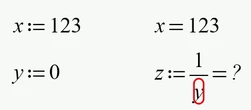
Its similar to evaluating a variable
Werner_E_2-1762025915294.png

and after disabling the evaluating region it would still show the former result
Werner_E_4-1762025969714.png

I think it would make more sense if all calculation results and error indicators would be deleted when a region is disabled.

On the other hand 'freezing' a result to compare it with a calculation done with changed input values might make sense in some cases, but there sure are other options as to achieve a similar effect.


According persistent error indicator I noticed an even worse effect in 2D plots. A red error border around a plot region would not go away even though the problem causing it was already fixed. A recalc did not solve the problem, saving, closing the sheet and reloading it did. A more convenient solution was to cut and then paste the plot region.

3 replies

Werner_E25-Diamond IAnswer
25-Diamond I
November 1, 2025

I had no problems to change the label of "rrpm" and "krrpm"from "Variable" to "Unit" via the menu.

Werner_E_0-1762024225828.png

But I remember that from time to time in the past I had a similar problem as the one you describe - changing the label via the menu did not work as the label would immediately snap back to "Variable" as soon as the focus was out of the region.

I don't know what caused that misbehavior.

But changing the label using the keyboard shortcuts always worked OK.

You can use Ctrl+Q to cycle through the seven label-types or you can use Ctrl+U to toggle between "Unit" and "Variable".


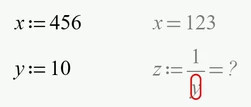
According Prime processing disabled regions: No, I don't think that disabled regions are processed to any degree. When you disable a region you still see the state the region was before disabling it.

So if you have a second global definition of the same variable or unit (which Prime no longer allows, unlike real Mathcad) is gets red bordered and when you disable the region the red border persists. I would call it a buggy behaviour or at least something undesirable.

Its similar to evaluating a variable

Werner_E_2-1762025915294.png

and after disabling the evaluating region it would still show the former result

Werner_E_4-1762025969714.png

I think it would make more sense if all calculation results and error indicators would be deleted when a region is disabled.

On the other hand 'freezing' a result to compare it with a calculation done with changed input values might make sense in some cases, but there sure are other options as to achieve a similar effect.


According persistent error indicator I noticed an even worse effect in 2D plots. A red error border around a plot region would not go away even though the problem causing it was already fixed. A recalc did not solve the problem, saving, closing the sheet and reloading it did. A more convenient solution was to cut and then paste the plot region.

krs10-MarbleAuthor
10-Marble
November 1, 2025

Thanks Werner - I tried the Ctrl-Q/U trick and that worked - glad to know (hope I can remember) - I assume this is documented in help somewhere? As for the disabled regions thing - I agree, it seems that the red box is static once the definition is disabled. I also discovered a difference between the local and global definitions -see updated attachment.

krs10-MarbleAuthor
10-Marble
November 1, 2025

updated file.


The weird thing is that when I reopened this doc I still saw the stuck label (stuck as variable) and several of you had no problem with this document. So it isn't the file itself??? Does that point to some system issue?

23-Emerald V
November 1, 2025

The new Maths Label sticks for me.


However, I notice that you're using Global Definitions.   The behaviour of these is markedly different from M15.   You can only define a name *once* using a global define.  Unless you have a pressing and unique need to use a global definition, I'd suggest you use the colon-equals definition.


StuartBruff_0-1762025241408.png


Stuart


krs10-MarbleAuthor
10-Marble
November 1, 2025

Hi Stuart - I had tried both definitions before and had the same problem (couldn't change a label from 'variable' to 'unit'). However, I did notice something else between the two definitions. See my response to Werner

Community Moderator
November 7, 2025

Hello @krs


It looks like you have some responses from our community experts. If any of these replies helped you solve your question please mark the appropriate reply as the Accepted Solution. 
Of course, if you have more to share on your issue, please let the Community know so other community members can continue to help you.

Thanks,
Vivek N.
Community Moderation Team.

krs10-MarbleAuthor
10-Marble
November 1, 2025

Providing an update as I continue to explore this. Thanks for all the input and wisdom. I will change all of my definitions in my included 'units' file to ":=", (local definitions). I don't imagine search and replace will work for that? Along those lines, any idea how to do search/replace operations on subscripted variables? Now that the subscript mechanism is not a character (ctrl+'-' vs '.'), you can't search for full subscripted variables.


Here is my new discovery - "including" a file appears to make the units definitions appear as 'variables' to the worksheet that envelops the included file. Here are my two test cases - maybe I'm drawing the wrong conclusion?