1-Visitor
October 2, 2012
Solved

insert percentage on table

  • October 2, 2012
  • 2 replies
  • 5135 views

Hello all,

Could you please tell me how do you insert (or make the program recognize) % in the Table unit placeholder on Prime 2.0 ? Thank you

Regards,

Lawrence

Best answer by AlanStevens

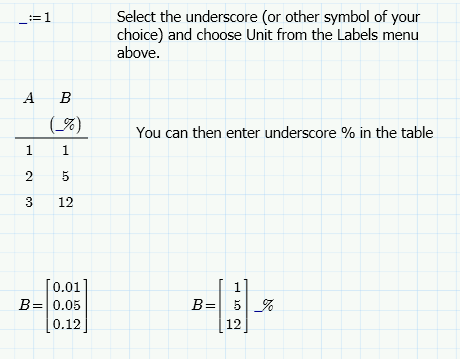
One, somewhat cumbersome, way below:

percent.PNG

There is probably a simpler way, but I can't see it!

Alan

2 replies

19-Tanzanite
October 2, 2012

One, somewhat cumbersome, way below:

percent.PNG

There is probably a simpler way, but I can't see it!

Alan

23-Emerald V
October 2, 2012

Try just typing "1%". That seems to give B= as the actual numbers (eg, 0.01, 0.5, 0.12), or at least it does in my Mathcad Prime 2 Express and Mathcad Prime 1. (your method doesn't seem to work on either of my Primes, so I'm probably doing something wrong ... you could try "_:=0.01 with your version?)

Stuart

1-Visitor
October 2, 2012

Maybe something like the attached?

Norm

24-Ruby IV
October 2, 2012

You can copy this "units" from the attached sheet:

Primile.png

PS

I know that PTC would like to go back to the old (Mathcad 15) tools of the working with %