1-Visitor
November 22, 2016
Solved

Integration with if function

  • November 22, 2016
  • 2 replies
  • 2047 views

I am trying to do some simple math to integrate a step change function using Mathcad 15.

The problem as simple as a capacitor has two values, at a threshold voltage.

When the voltage is below one value, say 20V, the capacitor is large, say 40pF

When the voltage is above the threshold, 20V, the capacitor is small, say 20pF.

To calculate the charge in the cap as a function of capacitor voltage, I can do it two ways.

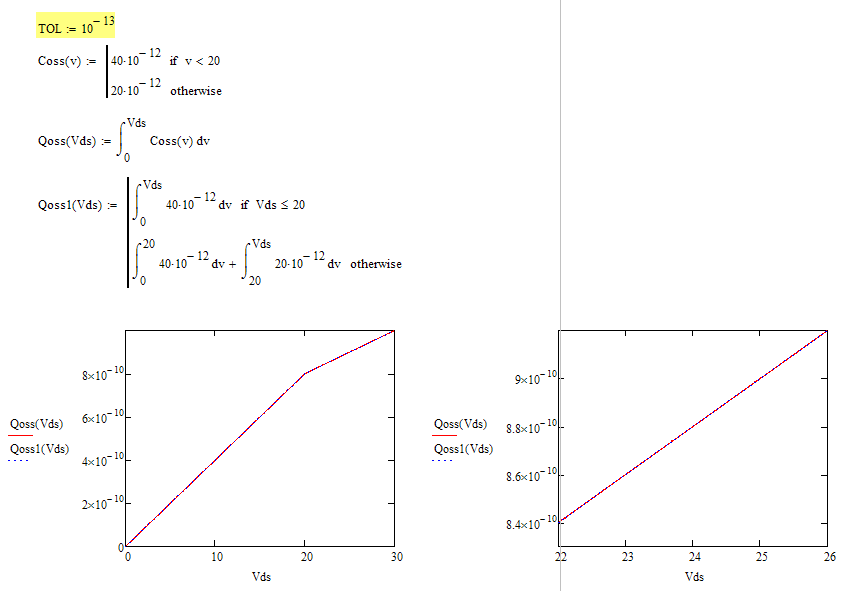
1, Define the capacitor value as a function of voltage and describe it as if function. Then integrate the capacitor with voltage to get charge.

2. directly integrated capacitor with voltage and put the if function in the integration equation.

The two results are very similar, however, the method one has significant error comparing with second method. See the attachment.

Is there any thing wrong with the algorithms inside the Mathcad that having trouble to handling the if function inside integration? I am using the integration with if function a lot and really concerning on the accuracy of the math.

Thanks.

Bing

Best answer by Werner_E

This accuracy problem can be fixed by changing the default value for TOL (which is 10^-3) to a much lower value which fits the magnitude of your data.

Set TOL:=10^-12 or lower at the top of your sheet and you will get what you expect.

Anyway its a strange effect. I would have expected similar inaccuracies with both methods.

2 replies

23-Emerald I
November 22, 2016

I'm not sure exactly what you're doing, but integrating over voltage is problematic--this is a time variant problem:

If you're integrating C dV, then the plot of q vs V should show a slope change when C changes (at 20 volts), and it does.  Why one of your functions shows a stepping plot I haven't figured out.

Werner_E25-Diamond IAnswer
25-Diamond I
November 22, 2016

This accuracy problem can be fixed by changing the default value for TOL (which is 10^-3) to a much lower value which fits the magnitude of your data.

Set TOL:=10^-12 or lower at the top of your sheet and you will get what you expect.

Anyway its a strange effect. I would have expected similar inaccuracies with both methods.

blu-21-VisitorAuthor
1-Visitor
November 22, 2016

Thanks. This makes sense.

It is interesting to observe that the tolerance can affect how the math goes. I'll make sure to adjust the tolerance in the future when I deal with small numbers.