

1-Visitor
November 18, 2014
Solved

Interpolation of a Matrix

  • November 18, 2014
  • 3 replies
  • 6656 views

I am doing some strain evaluation for dents in natural gas pipelines. I am looking to interpolate matrix to generate a larger matrix with more points. I am not sure how to go about doing this in mathcad.

My Matrix can vary in rows in and columns based on the user input. For this example 18 rows and 85 columns. Essentially I am looking to have more data points in order to evaluate the dent geometry.
Best answer by Werner_E

Curtis Edwards wrote:

It should provide a smoother dent profile (i.e.more points to run strain calculations on). I have attached the matrix above. Essentially from left to right it is measurements of the dent depth in the longitudinal direction and from top to bottom it is in the circumfrential direction.

The measurements are taken by gridding the pipe with half-inch squares and taking a measurement in each grid. When I receive the data it is merely a matrix like the one attached.

Your profile won't get smoother so maybe some kind of regression is more appropriate. You woud have to decide what kind to choise.

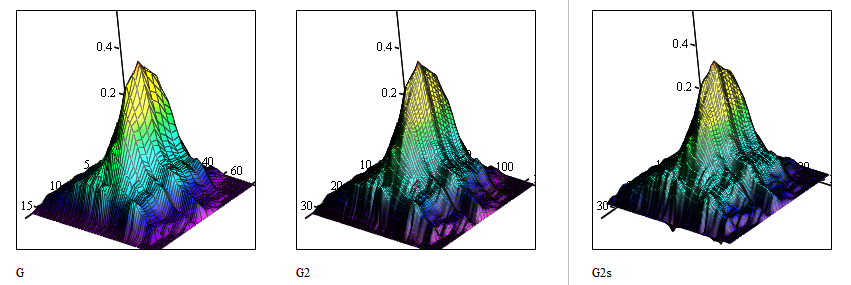
For whatever its worth here is a sheet which seems to do what you want using interpolation.

As an example I doubled the intervals in both directions. Here are the results with linear interpolation and cspline interpolation.

1.png

3 replies

24-Ruby IV
November 18, 2014

May be so

http://twt.mpei.ac.ru/ochkov/TTMI/1/1-2.png

25-Diamond I
November 18, 2014

Which version of Mathcad? Prime or real Mathcad?

cedwards1-VisitorAuthor
1-Visitor
November 18, 2014

Mathcad 15.

Im working off a sheet that a previous employee used to generate strain values on a dent. The strain values are approximated using a centered finite difference method. I am trying to track what the individual was doing but get lost at a point in the calculations.

In all references I've read it suggests using bspline interpolation. I'm not familar with that either.

19-Tanzanite
November 18, 2014

Don't use bspline. It doesn't necessarily interpolate data, because it is not forced to go through the existing data points. You can use either linear interpolation or spline interpolation, but then you should use cspline (or lspline or pspline, they are almost the same). To interpolate a matrix, just interpolate in one direction, then the other (for example, interpolate the columns to generate another row, then interpolate the rows to generate another column).

cedwards1-VisitorAuthor
1-Visitor
November 19, 2014

What if I do not have any column headers?

Can I still interpolate ?

I have matrix of n rows and m columns

i,j is the position in the matrix (X.0,0 being the orgin)

Attached is an example of the matrix I want to interpolate. I would like to take Matrix (G) and return an interpolated version of G (G2).

Thanks

25-Diamond I
November 19, 2014

Curtis Edwards wrote:

What if I do not have any column headers?

Can I still interpolate ?

Sure. Do you mean you don't know the meaning of the rows and columns in the matrix you have? In this case you may just use the row and column indices. But you have to be aware that adding values via interpolation does in no way add any precision and you sure will not get any additional information.

Maybe you set up a simplified worksheet and post it here to demeonstrate what exactly you need. In fact I am nor sure in which way additional interpolated matrix values would help you "to evaluate the dent geometry" as you wrote.

EDIT: OK, you edited your post while I was typing this reply and have added a sheet with a 18 x 85 matrix. Now we would need to know what exactly you mean with "interpolated version of G". What would you like your new matrix G2 look like? Again, you can magically add by interpolation additional information which simply is not here. So what exactly is the purpose of the interpolation you have in mind?

cedwards1-VisitorAuthor
1-Visitor
November 19, 2014

It should provide a smoother dent profile (i.e.more points to run strain calculations on). I have attached the matrix above. Essentially from left to right it is measurements of the dent depth in the longitudinal direction and from top to bottom it is in the circumfrential direction.

The measurements are taken by gridding the pipe with half-inch squares and taking a measurement in each grid. When I receive the data it is merely a matrix like the one attached.